SCROLLBAR (creation-only)
Associates a horizontal and/or vertical scrollbar to the element.
Value
"VERTICAL", "HORIZONTAL", "YES" (both) or "NO" (none).
Default: "NO"
Configuration Attributes (non-inheritable)
DX: Size of the thumb in the horizontal scrollbar. Also the horizontal page size. Default: "0.1".
DY: Size of the thumb in the vertical scrollbar. Also the vertical page size. Default: "0.1".
POSX: Position of the thumb in the horizontal scrollbar. Default: "0.0".
POSY: Position of the thumb in the vertical scrollbar. Default: "0.0".
XMIN: Minimum value of the horizontal scrollbar. Default: "0.0".
XMAX: Maximum value of the horizontal scrollbar. Default: "1.0".
YMIN: Minimum value of the vertical scrollbar. Default: "0.0".
YMAX: Maximum value of the vertical scrollbar. Default: "1.0".
LINEX: The amount the thumb moves when a horizontal step is performed. Default: 1/10th of DX.
LINEY: The amount the thumb moves when a vertical step is performed. Default: 1/10th of DY.
XAUTOHIDE: When enabled, if DX >= XMAX-XMIN then the horizontal scrollbar is hidden. Default: "YES".
YAUTOHIDE: When enabled, if DY >= YMAX-YMIN then the vertical scrollbar is hidden. Default: "YES".
XHIDDEN (read-only): returns if the scrollbar is hidden or not when XAUTOHIDE=YES.
YHIDDEN (read-only): returns if the scrollbar is hidden or not when YAUTOHIDE=YES.
SB_RESIZE (read-only): returns if a scrollbar visibility was changed forcing a canvas resize after setting DX or DY.
SCROLLVISIBLE (read-only): Returns which scrollbars are visible at the moment. Can be: YES (both), VERTICAL, HORIZONTAL, NO. The supported drivers are listed on each element page.
Notes
In Android and iOS, the canvas has no scrollbars: POSX/POSY/DX/DY are still tracked and SCROLL_CB is still called, but no scrollbar is drawn, so the contents are scrolled by dragging or by the wheel.
The scrollbar defines a virtual space associated to the element. In the image below, such space is marked in red, as well as the attributes that affect the composition of this space. In green, the image shows how these attributes are reflected on the scrollbar.
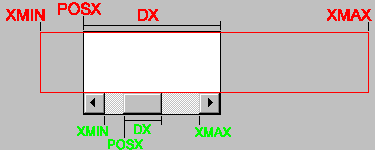
POSX is limited to XMIN and XMAX-DX, or XMIN<=POSX<=XMAX-DX.
Usually applications configure XMIN and XMAX to a region in World coordinates, and set DX to the canvas visible area in World coordinates. The canvas visible area in pixels, excluding scrollbars and borders, is returned by the DRAWSIZE attribute.
The LINEX, XMAX and XMIN attributes are only updated in the scrollbar when the DX attribute is updated.
When working with a virtual space with integer coordinates, set XMAX to the integer size of the virtual space, NOT to "width-1", or the last pixel of the virtual space will never be visible. When XMAX keeps the default value of 1.0 and only DX is controlled, use DX=visible_width/width.
When the virtual space has the same size as the canvas, i.e., when DX >= XMAX-XMIN, the scrollbar is automatically hidden if XAUTOHIDE=YES. The width of the vertical scrollbar (the same as the height of the horizontal scrollbar) can be obtained using the SCROLLBARSIZE global attribute.
The same is valid for YMIN, YMAX, DY and POSY. The Y axis is oriented from top to bottom in IUP. For bottom-up YMIN and YMAX, the actual YPOS is YMAX-DY-POSY.
Changes in the scrollbar parameters do NOT generate ACTION nor SCROLL_CB callback events. To update the canvas contents, call the application action callback or IupUpdate. But a change in the DX attribute may generate a RESIZE_CB callback event if XAUTOHIDE=YES.
To keep the thumb in the same relative position when XMIN, XMAX and DX change, recalculate POSX from the old position. For example, convert it to a 0-1 interval and then scale it to the new limits:
old_posx_relative = (old_posx - old_xmin)/(old_xmax - old_xmin)
posx = (xmax - xmin)*old_posx_relative + xminIupList, IupTree, and IupText/IupMultiline scrollbars are automatically managed and do NOT have the POS*, *MIN, MAX and D attributes.
When updating the virtual space size, or when the canvas is resized, with XAUTOHIDE=YES the actual DX can be computed with:
void scrollbar_update(Ihandle* ih, int view_width, int view_height)  /* view_width and view_height is the virtual space size */
{
  int elem_width, elem_height;
  int canvas_width, canvas_height;
  int sb_size = IupGetInt(NULL, "SCROLLBARSIZE");
  int border = IupGetInt(ih, "BORDER");

  IupGetIntInt(ih, "RASTERSIZE", &elem_width, &elem_height);

  /* remove BORDER (always size=1) */
  /* this is available drawing size not considering the scrollbars*/
  elem_width -= 2 * border;
  elem_height -= 2 * border;
  canvas_width = elem_width;
  canvas_height = elem_height;

  /* if view is greater than canvas in one direction,
     then it has scrollbars,
     but this affects the opposite direction */

  if (view_width > elem_width)  /* check for horizontal scrollbar */
    canvas_height -= sb_size;   /* affect vertical size */
  if (view_height > elem_height)
    canvas_width -= sb_size;

  if (view_width <= elem_width && view_width > canvas_width)  /* check again for horizontal scrollbar */
    canvas_height -= sb_size;
  if (view_height <= elem_height && view_height > canvas_height)  /* notice that these two ifs are mutually exclusive */
    canvas_width -= sb_size;

  if (canvas_width < 0) canvas_width = 0;
  if (canvas_height < 0) canvas_height = 0;

  IupSetFloat(ih, "DX", (float)canvas_width / (float)view_width);  /* normalize to 0-1 assuming XMIN-XMAX=0-1 */
  IupSetFloat(ih, "DY", (float)canvas_height / (float)view_height);

  /* Another approach is to set DX,DY to canvas_width,canvas_height
     and XMAX,YMAX to view_width,view_height */
}
Inside the canvas ACTION callback, the (x,y) offset for drawing is calculated as:
 int x, y, canvas_width, canvas_height;
float posy = IupGetFloat(ih, "POSY");
float posx = IupGetFloat(ih, "POSX");

IupGetIntInt(ih, "DRAWSIZE", &canvas_width, &canvas_height);

if (canvas_width < view_width)
  x = (int)floor(-posx*view_width);
else
  x = (canvas_width - view_width) / 2;  /* no scrollbar, for example, center the view */

if (canvas_height < view_height)
{
  /* posy is top-bottom, OpenGL is bottom-top.
     invert posy reference (YMAX-DY - POSY) */
  float dy = IupGetFloat(ih, "DY");
  posy = 1.0f - dy - posy;
  y = (int)floor(-posy*view_height);
}
else
  y = (canvas_height - view_height) / 2;  /* no scrollbar, for example, center the view */
Call scrollbar_update from the RESIZE_CB callback and when the zoom factor that affects view_width or view_height changes.
Affects
IupList, IupMultiline, IupCanvas