IupVal
Creates a Valuator control. Selects a value in a limited interval. Also known as Scale or Trackbar in native systems.
Creation
Ihandle* IupVal(const char *orientation);orientation: optional orientation of valuator. Can be NULL. See ORIENTATION attribute.
Returns: the identifier of the created element, or NULL if an error occurs.
Attributes
BGCOLOR: transparent in all systems except in Motif. It will use the background color of the native parent.
CANFOCUS (creation-only) (non-inheritable): enables the focus traversal of the control. Default: "YES".
PROPAGATEFOCUS (non-inheritable): enables the focus callback forwarding to the next native parent with FOCUS_CB defined. Default: "NO".
INVERTED: Invert the minimum and maximum positions on screen. When INVERTED=YES maximum is at top and left (minimum is bottom and right), when INVERTED=NO maximum is at bottom and right (minimum is top and left). The default depends on the ORIENTATION passed on creation: YES for VERTICAL, NO for HORIZONTAL. In Cocoa, it is read-only, fixed to the default for the orientation.
MAX: Contains the maximum valuator value. Default: "1". When changed the display will not be updated until VALUE is set.
MIN: Contains the minimum valuator value. Default: "0". When changed the display will not be updated until VALUE is set.
PAGESTEP: Controls the increment for PgDn and PgUp
keys. It is not the size of the increment. The increment size is
"pagestep*(max-min)", so it must be 0 < pagestep < 1.
Default: "0.1". Not supported in Android.
SIZE (non-inheritable): The natural size is 100 pixels along the orientation (84 in Qt, 80 in Haiku and WebAssembly, 180 in iOS, 200 in Android) and the native thickness across it. In Win32, Motif, Cocoa, FLTK, Qt, QML and iOS, the ticks are added to the thickness.
SHOWTICKS: The number of tick marks along the valuator trail. Minimum value is "2". Default: "0", in this case the ticks are not shown. In Win32 and Motif, it cannot be changed to 0 from a non-zero value, or vice versa, after the control is mapped. Not supported in EFL.
STEP: Controls the increment for keyboard control
and the mouse wheel. It is not the size of the increment. The increment
size is "step*(max-min)", so it must be 0 < step < 1.
Default: "0.01". Not supported in Android.
TICKSPOS (creation-only): Allows to position the ticks in both sides (BOTH) or in the reverse side (REVERSE). Default: "NORMAL". The normal position for horizontal orientation is at the top of the control, and for vertical orientation is at the left of the control. Not supported in Cocoa, EFL, Motif, Android and WebAssembly. In Cocoa, Motif, Android and WebAssembly, the ticks position is fixed.
ORIENTATION (creation-only) (non-inheritable): Informs whether the valuator is "VERTICAL" or "HORIZONTAL". Vertical valuators are bottom to up, and horizontal valuators are left to right variations of min to max (but can be inverted using INVERTED). Default: "HORIZONTAL".
VALUE (non-inheritable): Contains a number between MIN and MAX, indicating the valuator position. A value outside MIN and MAX, set in VALUE or current when they are set, is changed to the nearest of them. Default: "0.0".
ACTIVE, CURSOR, EXPAND, FONT, SCREENPOSITION, POSITION, MINSIZE, MAXSIZE, WID, TIP, RASTERSIZE, ZORDER, VISIBLE, THEME: also accepted.
Callbacks
VALUECHANGED_CB: Called after the value was interactively changed by the user.
int function(Ihandle *ih);ih: identifier of the element that activated the event.
MAP_CB, UNMAP_CB, DESTROY_CB, GETFOCUS_CB, KILLFOCUS_CB, ENTERWINDOW_CB, LEAVEWINDOW_CB, K_ANY, HELP_CB: All common callbacks are supported.
Notes
Pressing the primary mouse button on the track moves the handle to that point, and dragging continues from there. In GTK 3 and GTK 4, this follows the gtk-primary-button-warps-slider setting, which is TRUE by default.
In Motif, after the user clicks the handle a KILLFOCUS will be ignored when the control loses its focus.
Keyboard Mapping
This is the default mapping when INVERTED has the default value, or ORIENTATION=HORIZONTAL+INVERTED=NO.
| Keys | Action for HORIZONTAL |
| Right Arrow | move right, increment by one step |
| Left Arrow | move left, decrement by one step |
| Ctrl+Right Arrow or PgDn | move right, increment by one page step |
| Ctrl+Left Arrow or PgUp | move left, decrement by one page step |
| Home | move all left, set to minimum |
| End | move all right, set to maximum |
This is the default mapping when INVERTED has the default value, or ORIENTATION=VERTICAL+INVERTED=YES.
| Keys | Action for VERTICAL |
| Up Arrow | move up, increment by one step |
| Down Arrow | move down, decrement by one step |
| Ctrl+Up Arrow or PgUp | move up, increment by one page step |
| Ctrl+Down Arrow or PgDn | move down, decrement by one page step |
| Home | move all up, set to maximum |
| End | move all down, set to minimum |
Visually, all the keys move to the same direction independent of the INVERTED attribute.
Semantically, all the keys change the value depending on the INVERTED attribute.
This behavior is slightly different from the behavior defined by the native systems (Home and End keys are different). But it is the same in all systems.
Examples
| GTK | Qt | Win32 | macOS |
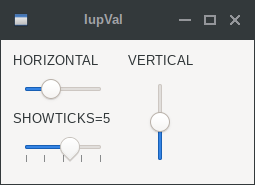 |
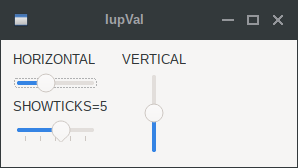 |
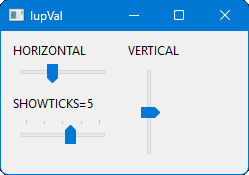 |
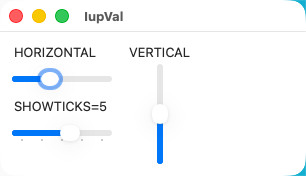 |