IupProgressBar
Creates a progress bar control. Shows a percent value that can be updated to simulate a progression.
It is similar to IupGauge, but uses native controls internally. Also does not have support for text inside the bar.
Creation
Ihandle* IupProgressBar(void);Returns: the identifier of the created element, or NULL if an error occurs.
Attributes
BGCOLOR: controls the background color. Default: the global attribute DLGBGCOLOR. In Android, the platform theme background is used.
CIRCULAR (creation-only): when "YES", displays a circular spinner instead of a linear bar. Default: "NO". VALUE is displayed in Android, macOS and WinUI when MARQUEE is "NO"; in the other drivers the spinner is always animated. DASHED and ORIENTATION are ignored. Not supported in Win32, Qt, FLTK, Motif, Haiku and WebAssembly.
DASHED: Changes the style of the progress bar for a dashed pattern. Default: "NO". In Windows, it is creation-only and not supported when using Visual Styles. Supported in Win32 (without Visual Styles), GTK 2, GTK 3, GTK 4, Qt, QML, WebAssembly and iOS.
FGCOLOR: Controls the bar color. By default the native/system bar color is used. Not supported in macOS and EFL. In QML, the Basic style ignores it.
MARQUEE (creation-only): displays an undefined state. Default: "NO". After map it can only start or stop the animation. In Windows, it will work only if using Visual Styles.
MAX (non-inheritable): Contains the maximum value. Default: "1". The control display is not updated, must set VALUE attribute to update.
MIN (non-inheritable): Contains the minimum value. Default: "0". The control display is not updated, must set VALUE attribute to update.
ORIENTATION (creation-only): can be "VERTICAL" or "HORIZONTAL". Default: "HORIZONTAL". Horizontal goes from left to right, and vertical from bottom to top.
RASTERSIZE: The initial size is 200 pixels along the bar (width for HORIZONTAL, height for VERTICAL); the other dimension uses the native minimum. When CIRCULAR=YES it is "48x48". Set to NULL to allow the use of smaller values in the layout computation.
VALUE (non-inheritable): Contains a number between "MIN" and "MAX", controlling the current position. A value outside MIN and MAX, set in VALUE or current when they are set, is changed to the nearest of them.
ACTIVE, EXPAND, FONT, SCREENPOSITION, POSITION, MINSIZE, MAXSIZE, WID, TIP, SIZE, ZORDER, VISIBLE, THEME: also accepted.
Callbacks
MAP_CB, UNMAP_CB, DESTROY_CB: common callbacks are supported.
Examples
| GTK | Qt | Win32 | macOS |
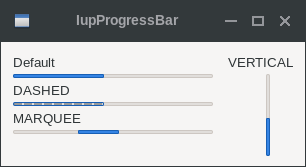 |
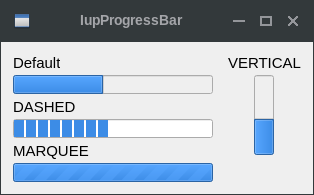 |
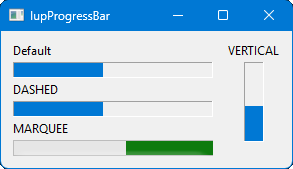 |
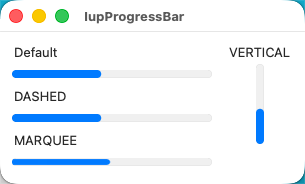 |