IupWebBrowser
Creates a web browser control. It is responsible for managing the drawing of the web browser content and forwarding of its events.
In Linux, the implementation uses WebKitGTK, a GTK port of WebKit, an open-source web content engine. When using GTK 2, it uses the WebKit1 API. When using GTK 3, it uses the WebKit2 API. When using GTK 4, it uses the WebKit6 API. The WebKit library is loaded dynamically at runtime.
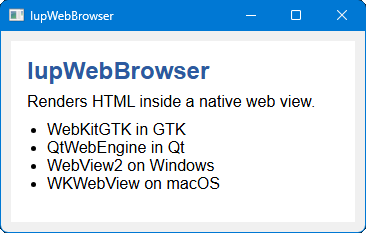
In Windows, the implementation uses WebView2, the Chromium-based web control from Microsoft Edge. The WebView2 runtime is detected and loaded automatically.
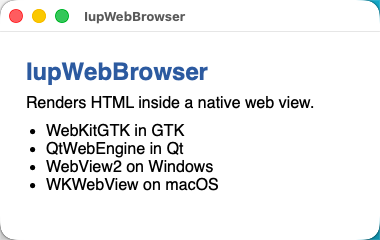
In macOS, the implementation uses WKWebView from the WebKit framework.
In Qt, the implementation uses QWebEngineView from QtWebEngine (Chromium-based).
In Haiku, the implementation uses BWebView from the system Legacy WebKit library (libWebKitLegacy).
In Android, the implementation uses the system WebView.
In WebAssembly, the implementation uses an HTML
<iframe>. Cross-origin pages cannot be scripted or
introspected. A page loaded with VALUE is sandboxed and has a unique
origin, with scripts, forms and popups allowed. Content loaded with HTML
is not sandboxed and uses the origin of the application page. The
javascript: and vbscript: schemes are rejected
in VALUE.
Not supported: BACKCOUNT, FORWARDCOUNT, CANGOBACK, CANGOFORWARD, ITEMHISTORY, OPENFILE, SAVEFILE and PRINTPREVIEW.
Initialization and Usage
The IupWebBrowserOpen function must be called after
IupOpen. The "iupweb.h" file must also be included in
the source code. The program must be linked to the web library (iupweb).
In Go it needs the web build tag.
In Linux, the WebKitGTK library is loaded dynamically at runtime. If not found, IupWebBrowserOpen will return IUP_ERROR. In Windows, the WebView2 runtime is detected when the control is mapped. If not found, IupMap will return IUP_ERROR. In both cases, the global attribute IUP_WEBBROWSER_MISSING_LIB will be set with the name of the missing library.
Creation
Ihandle* IupWebBrowser(void);Returns: the identifier of the created element, or NULL if an error occurs.
Attributes
BACKCOUNT (read-only): gets the number of items that precede the current page.
BACKFORWARD (write-only): sets the number of steps away from the current page and loads the history item. Negative values represent steps backward while positive values represent steps forward.
GOBACK (write-only): go to the previous page. Same as BACKFORWARD=-1.
GOFORWARD (write-only): go to the next page. Same as BACKFORWARD=1.
CANGOBACK (read-only): informs if there is a previous page.
CANGOFORWARD (read-only): informs if there is a next page.
COPY (write-only): copy the selection to the clipboard.
FORWARDCOUNT (read-only): gets the number of items that succeed the current page.
HTML: loads a given HTML content.
ITEMHISTORYid (read-only): Returns the URL associated with a specific history item. Negative "id" value represents a backward item while positive "id" value represents a forward item ("0" represents the current item).
INNERTEXT: the innerText property of the HTML element marked with the ID given by the attribute ELEMENT_ID.
ATTRIBUTE: the content attribute of the HTML element marked with the ID given by the attribute ELEMENT_ID. The name of the content attribute is given by the attribute ATTRIBUTE_NAME.
JAVASCRIPT: executes JavaScript code and returns the result as a string.
PRINT (write-only): shows the print dialog.
PRINTPREVIEW (write-only): shows a print preview dialog.
RELOAD (write-only): reloads the page in the webbrowser.
SELECTALL (write-only): selects all contents.
STATUS (read-only): returns the load status. Can be "LOADING", "COMPLETED" or "FAILED".
STOP (write-only): stops any ongoing load in the webbrowser.
VALUE: sets a specified URL to load into the webbrowser, or retrieve the current URL.
ZOOM: the zoom factor of the browser in percent. No zoom is 100%.
EDITABLE: enable the design mode, or the WYSIWYG HTML editor. Can be YES or NO.
(All the following attributes depend on the EDITABLE attribute)
NEW (write-only): initializes a blank document. Value is ignored.
OPENFILE (write-only): open an HTML file given its filename.
SAVEFILE (write-only): save the contents in an HTML file given its filename.
DIRTY (read-only): Returns YES or NO if the contents have been edited by the user.
UNDO (write-only): undo the last editing.
REDO (write-only): redo the last editing.
CUT (write-only): cuts the selection to the clipboard.
PASTE (write-only): pastes the clipboard to the selection or caret.
SELECTALL (write-only): selects all the contents.
FIND (write-only): shows a dialog for finding a text.
EXECCOMMAND (write-only): executes an editing command. Possible commands: CUT, COPY, PASTE, UNDO, REDO, SELECTALL, BOLD, ITALIC, UNDERLINE, STRIKETHROUGH, JUSTIFYLEFT, JUSTIFYCENTER, JUSTIFYRIGHT, JUSTIFYFULL, INDENT, OUTDENT, REMOVEFORMAT, DELETE, SUBSCRIPT, SUPERSCRIPT, INSERTORDEREDLIST, INSERTUNORDEREDLIST, UNLINK.
COMMANDSTATE (read-only): returns the command state. Can be YES or NO. The command name must be stored on the attribute COMMAND.
COMMANDENABLED (read-only): returns if the command is enabled. Can be YES or NO. The command name must be stored on the attribute COMMAND.
COMMANDTEXT (read-only): returns the command text if any. The command name must be stored on the attribute COMMAND.
COMMANDVALUE (read-only): returns the command value if any. The command name must be stored on the attribute COMMAND.
INSERTIMAGE (write-only): inserts an image given its url.
INSERTIMAGEFILE (write-only): inserts an image given its filename.
CREATELINK (write-only): inserts a link given its url.
INSERTTEXT (write-only): inserts a text at the current selection or caret.
INSERTHTML (write-only): inserts a formatted text at the current selection or caret.
FONTNAME: font face name.
FONTSIZE: font relative size. Can be a number form "1" to "7", meaning 1: x-small, 2: small, 3: medium, 4: large, 5: x-large, 6: xx-large, 7: xxx-large.
FORMATBLOCK: The block format. It can be: "Heading 1", "Heading 2", "Heading 3", "Heading 4", "Heading 5", "Heading 6", "Paragraph", "Preformatted" and "Block Quote".
FORECOLOR: the foreground color of the selected text.
BACKCOLOR: the background color of the selected text.
ACTIVE, FONT, EXPAND, SCREENPOSITION, POSITION, MINSIZE, MAXSIZE, WID, TIP, RASTERSIZE, ZORDER, VISIBLE: also accepted.
Callbacks
COMPLETED_CB: action generated when a
page successfully completed. Can be called multiple times when a frame
set loads its frames, or when a page loads also other pages.
int function(Ihandle* ih, char* url);ih: identifier of the element that activated the
event.
url: the URL address that completed.
ERROR_CB: action generated when page
load fail.
int function(Ihandle* ih, char* url);ih: identifier of the element that activated the
event.
url: the URL address that caused the error.
NAVIGATE_CB: action generated when the
browser requests a navigation to another page. It is called before
navigation occurs. Can be called multiple times when a frame set loads
its frames, or when a page loads also other pages.
int function(Ihandle* ih, char* url);ih: identifier of the element that activated the
event.
url: the URL address to navigate to.
Returns: IUP_IGNORE will abort navigation.
NEWWINDOW_CB: action generated when the
browser requests a new window.
int function(Ihandle* ih, char* url);ih: identifier of the element that activated the
event.
url: the URL address that is opened in the new
window.
UPDATE_CB: action generated when the selection was changed and the editor interface needs an update. Used only when EDITABLE=YES.
int function(Ihandle* ih);ih: identifier of the element that activated the event.
MAP_CB, UNMAP_CB, DESTROY_CB: callbacks are supported.
Examples
| Win32 | macOS |
 |
 |