IupDialog
Creates a dialog element. It manages user interaction with the interface elements. For any interface element to be shown, it must be encapsulated in a dialog.
Creation
Ihandle* IupDialog(Ihandle *child);child: Identifier of an interface element. The dialog has only one child. It can be NULL.
Returns: the identifier of the created element, or NULL if an error occurs.
In WebAssembly the dialog is a region of the browser page. The first dialog has no title bar and its TITLE becomes the document title. A dialog with a PARENTDIALOG gets a simulated title bar when TITLE is set or MENUBOX=YES; it can be dragged to move the dialog and carries a close button when MENUBOX=YES. MAXBOX, MINBOX, CUSTOMFRAME, HIDETASKBAR and TOPMOST have no effect.
Attributes
Common
BACKGROUND (non-inheritable): Dialog background color or image. Can be a non-inheritable alternative to BGCOLOR or can be the name of an image to be tiled on the background.
BACKIMAGEZOOM (non-inheritable): if set, the BACKGROUND image is zoomed to occupy the full background instead of being tiled. Not supported in Android.
BORDER (non-inheritable) (creation-only): Shows a resize border around the dialog. Default: "YES". BORDER=NO is useful only when RESIZE=NO, MAXBOX=NO, MINBOX=NO, MENUBOX=NO and TITLE=NULL, if any of these are defined there will be always some border.
BORDERSIZE (non-inheritable) (read-only): returns the border size.
CHILDOFFSET: Allow to specify a position offset for the child. Available for native containers only. It will not affect the natural size, and allows to position controls outside the client area. Format "dxxdy", where dx and dy are integer values corresponding to the horizontal and vertical offsets, respectively, in pixels. Default: 0x0.
CURSOR (non-inheritable): Defines a cursor for the dialog.
EXPAND (non-inheritable): The default value is "YES".
NACTIVE (non-inheritable): same as ACTIVE but does not affect the controls inside the dialog.
SIZE (non-inheritable): Dialog’s size. Additionally, the following values can also be defined for width and/or height:
- "FULL": Defines the dialog’s width (or height) equal to the screen's width (or height)
- "HALF": Defines the dialog’s width (or height) equal to half the screen's width (or height)
- "THIRD": Defines the dialog’s width (or height) equal to 1/3 the screen's width (or height)
- "QUARTER": Defines the dialog’s width (or height) equal to 1/4 of the screen's width (or height)
- "EIGHTH": Defines the dialog’s width (or height) equal to 1/8 of the screen's width (or height)
The dialog Natural size is only considered when the User size is not defined or when it is bigger than the Current size. This behavior is different from a control that goes inside the dialog. Because of that, when SIZE or RASTERSIZE are set (changing the User size), the Current size is internally reset to 0x0, so the Natural size can be considered when re-computing the Current size of the dialog.
Values set at SIZE or RASTERSIZE attributes of a dialog are always accepted, regardless of the minimum size required by its children. For a dialog to have the minimum necessary size to fit all elements contained in it, simply define SIZE or RASTERSIZE to NULL. Also, if you set SIZE or RASTERSIZE to be used as the initial size of the dialog, its contents will be limited to this size as the minimum size, if you do not want that, then after showing the dialog reset this size to NULL so the dialog can be resized to smaller values. But notice that its contents will still be limited by the Natural size, to also remove that limitation set SHRINK=YES. To only change the User size in pixels, without resetting the Current size, set the USERSIZE attribute.
Notice that the dialog size includes its decoration (it is the Window size), the area available for controls are returned by the dialog CLIENTSIZE. For more information see Layout Guide.
SIMULATEMODAL (write-only): disable all other visible dialogs, just like when the dialog is made modal.
TITLE (non-inheritable): Dialog’s title. Default: NULL. If you want to remove the title bar, you must also set MENUBOX=NO, MAXBOX=NO and MINBOX=NO, before map. But in Motif and GTK it will hide it only if RESIZE=NO also.
VISIBLE: Simply call IupShow or IupHide for the dialog.
ACTIVE, BGCOLOR, FONT, EXPAND, SCREENPOSITION, WID, TIP, CLIENTOFFSET, CLIENTSIZE, RASTERSIZE, ZORDER: also accepted. Note that ACTIVE, BGCOLOR and FONT will also affect all the controls inside the dialog.
Drag & Drop attributes and callbacks are supported.
Exclusive
CUSTOMFRAMESIMULATE: allows the application to customize the dialog frame elements (the title and its buttons) by using IUP controls for its elements like caption, minimize button, maximize button, and close buttons. The custom frame support is entirely simulated by IUP, no native support for custom frame is used (this seems to have fewer drawbacks on the application behavior). The application is responsible for leaving space for the borders. One drawback is that menu bars will not work. For the dialog to be able to be moved an IupLabel, or a IupFlatLabel or an IupCanvas must be at the top of the dialog and must have the NAME attribute set to CUSTOMFRAMECAPTION. See the Custom Frame notes below.
By setting this attribute, the following attributes will be set:
RESIZE=NO
MENUBOX=NO
MAXBOX=NO
MINBOX=NO
BORDER=NO
TITLE=NULL
MENU=NULL
TASKBARBUTTON=SHOW
The BUTTON_CB and MOTION_CB callbacks of the dialog will be set too, so the dialog can be resized. The BUTTON_CB and MOTION_CB callbacks of the element with NAME=CUSTOMFRAMECAPTION will also be changed so the dialog can be moved and maximized with double click. It is application responsibility to implement the minimize, maximize and close buttons.
DEFAULTENTER: Name of the button activated when the user press Enter when focus is in another control of the dialog. Use IupSetHandle or IupSetAttributeHandle to associate a button to a name. The referenced button automatically receives the SHOWASDEFAULT visual emphasis so the user can identify which button responds to Enter.
DEFAULTESC: Name of the button activated when the user presses Esc when focus is in another control of the dialog. Use IupSetHandle or IupSetAttributeHandle to associate a button to a name.
DIALOGFRAME: Set the common decorations for modal dialogs. This means RESIZE=NO, MINBOX=NO and MAXBOX=NO. In Windows, if the PARENTDIALOG is defined then the MENUBOX is also removed, but the Close button remains.
ICON: Dialog’s icon. The Windows SDK recommends that cursors and icons should be implemented as resources rather than created at run time.
FULLSCREEN: Makes the dialog occupy the whole screen over any system bars in the main monitor. All dialog details, such as title bar, borders, maximize button, etc., are removed. Possible values: YES, NO. In Motif, you may have to click in the dialog to set its focus. In Motif if set to YES when the dialog is hidden, then it cannot be changed after it is visible.
MAXBOX (creation-only): Requires a maximize button from the window manager. If RESIZE=NO then MAXBOX will be set to NO. Default: YES. In Motif the decorations are controlled by the Window Manager and may not be possible to be changed from IUP. In Windows MAXBOX is hidden only if MINBOX is hidden as well, or else it will be just disabled.
MAXSIZE: Maximum size for the dialog in raster units (pixels). The windowing system will not be able to change the size beyond this limit. Default: 65535x65535.
MENU: Name of a menu. Associates a menu to the dialog as a menu bar. The previous menu, if any, is unmapped. Use IupSetHandle or IupSetAttributeHandle to associate a menu to a name. See also IupMenu.
MENUBARKEY (non-inheritable): whether F10 opens the menu bar. Default: YES. Set to NO so the application receives F10 in K_ANY. Supported in GTK and GTK 4; in GTK 3 it affects every dialog of the application, in GTK 4 only this dialog.
MENUBOX (creation-only): Requires a system menu box from the window manager. If hidden will also remove the Close button. Default: YES. In Motif the decorations are controlled by the Window Manager and may not be possible to be changed from IUP. In Windows if hidden will hide also MAXBOX and MINBOX.
MINBOX (creation-only): Requires a minimize button from the window manager. Default: YES. In Motif the decorations are controlled by the Window Manager and may not be possible to be changed from IUP. In Windows MINBOX is hidden only if MAXBOX is hidden as well, or else it will be just disabled.
MINSIZE: Minimum size for the dialog in raster units (pixels). The windowing system will not be able to change the size beyond this limit. Default: 1x1. Some systems define a very minimum size greater than this, for instance in Windows the horizontal minimum size includes the window decoration buttons.
MODAL (read-only): Returns the popup state. It is "YES" if the dialog was shown using IupPopup. It is "NO" if IupShow was used, or it is not visible. At the first time the dialog is shown, MODAL is not set yet when SHOW_CB is called.
NATIVEPARENT (creation-only): Native handle of a dialog to be used as parent. Used only if PARENTDIALOG is not defined.
PARENTDIALOG (creation-only): Name of a dialog to be used as parent.
PLACEMENT: Changes how the dialog will be shown. Values: "FULL", "MAXIMIZED", "MINIMIZED" and "NORMAL". Default: NORMAL. After IupShow/IupPopup the attribute is set back to "NORMAL". FULL is similar to FULLSCREEN, but only the dialog client area covers the screen area, menu and decorations will be there but out of the screen. In UNIX there is a chance that the placement won't work correctly, that depends on the Window Manager. In WebAssembly FULL and MAXIMIZED both fill the browser viewport, and MINIMIZED has no effect. The SHOWNOACTIVATE attribute can be set to YES to prevent the window from being activated [Win32, WinUI, Qt and Cocoa]. The SHOWMINIMIZENEXT attribute can be set to YES to activate the next top-level window in the Z order when minimizing [Win32 and WinUI].
RESIZE (creation-only): Allows interactively changing the dialog’s size. Default: YES. If RESIZE=NO then MAXBOX will be set to NO. In Motif the decorations are controlled by the Window Manager and may not be possible to be changed from IUP.
RESIZEINC: Size step for the interactive resize, in raster units (pixels). The dialog size changes in multiples of these values, counted from MINSIZE. Default: NULL. Not supported in Haiku, Android, iOS and WebAssembly. In GTK 4, Qt and FLTK it requires X11. In macOS the steps are counted from the current size.
SHRINK: Allows changing the elements’ distribution when the dialog is smaller than the minimum size. Default: NO. Android and iOS default to YES.
STARTFOCUS: Name of the element that must receive the focus right after the dialog is shown using IupShow or IupPopup. If not defined then the first control than can receive the focus is selected (same effect of calling IupNextField for the dialog). Updated after SHOW_CB is called and only if the focus was not changed during the callback.
SHOWNOFOCUS: do not set focus after show. On Android and iOS defaults to YES; touch UIs don't autofocus controls on launch.
ACTIVEWINDOW (read-only): informs if the dialog is the active window (the window with focus). Can be YES or NO. Not supported in Motif, Android and iOS.
BRINGFRONT (write-only): makes the dialog the foreground window. Use "YES" to activate it. Useful for multithreaded applications.
CUSTOMFRAME (non-inheritable): allows the application to customize the dialog frame elements (the title and its buttons) by using IUP controls for its elements like caption, minimize button, maximize button, and close buttons. The custom frame support uses the native system support for custom frames. The application is responsible for leaving space for the borders. One drawback is that menu bars will not work. For the dialog to be able to be moved an IupLabel or an IupCanvas must be at the top of the dialog and must have the NAME attribute set to CUSTOMFRAMECAPTION. See the Custom Frame notes below. Not supported in Motif.
DIALOGHINT (creation-only): if enabled, set the window type hint to a dialog hint. Supported in GTK, GTK 4, Qt, macOS, and EFL.
DROPFILESTARGET (non-inheritable): Enable or disable the drop of files. Default: NO, but if DROPFILES_CB is defined when the element is mapped then it will be automatically enabled.
HIDETITLEBAR (non-inheritable): hides the title bar
with all its elements. In Motif the result depends on the window manager
honoring _MOTIF_WM_HINTS (most modern WMs do).
MAXIMIZED (read-only): indicates if the dialog is maximized. Can be YES or NO. Not supported in Motif, Android and iOS.
MINIMIZED (read-only): indicates if the dialog is minimized. Can be YES or NO. Not supported in Motif, Android, iOS and WebAssembly.
OPACITY: sets the dialog transparency alpha value. Valid values range from 0 (completely transparent) to 255 (opaque). In Windows (Win32) must be set before map so the native window would be properly initialized when mapped. In Motif requires a running compositor. In EFL requires X11 and a running compositor. Not supported in FLTK.
OPACITYIMAGE: sets an RGBA image as the dialog background so it is possible to create a non rectangle window with transparency, but it can not have children. Used usually for splash screens. It must be set before map so the native window would be properly initialized when mapped. In GTK and Qt requires a running compositor. Not supported in GTK4, Motif, WinUI, FLTK, iOS, Android, Haiku and WebAssembly.
SHAPEIMAGE: sets an RGBA image as the dialog shape, so it is possible to create a non rectangle window with children. Only the fully transparent pixels will be transparent. The pixels colors will be ignored, only the alpha channel is used. Not supported in GTK4, Motif, iOS, Android, Haiku and WebAssembly.
TOOLBOX (creation-only): makes the dialog look like a toolbox with a smaller title bar. Default: NO. Supported in Win32, WinUI, Qt and Haiku. In Win32 and WinUI it is only valid if the PARENTDIALOG or NATIVEPARENT attribute is also defined.
TOPMOST: puts the dialog always in front of all
other dialogs in all applications. Default: NO. In Motif and EFL depends
on the window manager honoring _NET_WM_STATE_ABOVE. Not
supported in GTK4, FLTK, iOS, and Android.
Exclusive [System Dependent]
HWND [Windows Only] (non-inheritable, read-only): Returns the Windows Window handle. Available in Win32, WinUI, or in the GTK, GTK 4, Qt and FLTK drivers on Windows.
SAVEUNDER [Win32 and Motif Only] (creation-only): When this attribute is true (YES), the dialog requests the window system to store the original image of the desktop region it occupies, so closing or moving the dialog does not trigger a redraw of the windows beneath it. Its default value is YES if the dialog has a parent dialog. Largely a no-op on modern composited window systems (DWM on Windows, KWin/Mutter on Linux); other drivers do not expose an equivalent primitive.
XWINDOW [UNIX Only] (non-inheritable, read-only): Returns the X-Windows Window (Drawable). Available in Motif, GTK, GTK 4, Qt, FLTK and EFL on X11.
WL_SURFACE [UNIX Only] (non-inheritable, read-only): Returns the Wayland surface handle. Available in GTK, GTK 4, Qt, FLTK and EFL on Wayland.
NSVIEW [macOS Only] (non-inheritable, read-only): Returns the Cocoa NSView handle. Available in the Cocoa, GTK, GTK 4, Qt and FLTK drivers on macOS.
BWINDOW [Haiku Only] (non-inheritable, read-only): Returns the Haiku BWindow handle.
Exclusive [Windows Only]
COMPOSITED [Win32 Only] (creation-only): controls if the window will have an automatic double buffer for all children. Default is "NO". It is NOT compatible with IupCanvas, and all derived IUP controls such as IupFlat*, IupGL*, IupPlot and IupMatrix, because IupCanvas uses CS_OWNDC in the window class. Largely obsolete since Windows Vista, as the DWM compositor already prevents window flicker.
CUSTOMFRAMEDRAW [Win32 Only] (non-inheritable): allows the application to customize the dialog frame elements (the title and its buttons) by drawing them with the CUSTOMFRAMEDRAW_CB callback. Can be YES or NO. The Window client area is expanded to include the whole window. Notice that the dialog attributes like BORDER, RESIZE, MAXBOX, MINBOX and TITLE must still be defined. But maximize, minimize and close buttons must be manually implemented in the BUTTON_CB callback. One drawback is that menu bars will not work. Not available in WinUI, use CUSTOMFRAME instead.
CUSTOMFRAMECAPTIONHEIGHT [Win32, WinUI Only] (non-inheritable): height of the caption area. If not defined it will use the system size.
CUSTOMFRAMECAPTIONLIMITS [Win32 Only] (non-inheritable): limits of the caption area at left and at right. The caption area is always expanded inside the limits when the dialog is resized. Format is "left:right" or in C "%d:%d". Default: "0:0". This will allow the dialog to be moved by the system when the user clicks and drags the caption area. If not defined but CUSTOMFRAMECAPTION is defined, then it will use the caption element horizontal position and size for the limits.
HELPBUTTON [Win32 Only] (creation-only): Inserts a help button in the same place of the maximize button. It can only be used for dialogs without the minimize and maximize buttons, and with the menu box. For the next interaction of the user with a control in the dialog, the callback HELP_CB will be called instead of the control defined ACTION callback. Possible values: YES, NO. Default: NO.
MAXIMIZEATPARENT [Win32 Only]: when using multiple monitors, maximize the dialog in the same monitor that the parent dialog is.
Exclusive Taskbar
HIDETASKBAR (write-only): Action attribute that when set to "YES", hides the dialog, but does not decrement the visible dialog count, does not call SHOW_CB and does not mark the dialog as hidden inside IUP. It is usually used to hide the dialog and keep the tray icon working without closing the main loop. It has the same effect as setting LOCKLOOP=YES and normally hiding the dialog. IMPORTANT: when you hide using HIDETASKBAR, you must show using HIDETASKBAR also. Possible values: YES, NO. Not supported in Android and iOS.
TASKBARPROGRESS [Win32, WinUI, Cocoa Only] (write-only): enables a progress bar drawn on the application's taskbar/Dock button. Default: NO.
TASKBARPROGRESSSTATE [Win32, WinUI, Cocoa Only] (write-only): sets the type and state of the progress indicator. Possible values: NORMAL, PAUSED, ERROR, INDETERMINATE, NOPROGRESS. Default: NORMAL.
TASKBARPROGRESSVALUE [Win32, WinUI, Cocoa Only] (write-only): updates the progress bar to the given percentage. The value must be between 0 and 100.
TASKBARBUTTON: If set to SHOW force the application button to be shown on the taskbar even if the dialog does not have decorations. If set to HIDE force the application button to be hidden from the taskbar. In Win32 and WinUI HIDE also hides the system menu, the maximize and minimize buttons. In GTK, GTK 4, Qt, Motif, EFL and FLTK it requires X11; in Qt it needs Qt 6.2 or newer. Not supported in macOS, Haiku, Android, iOS and WebAssembly.
Exclusive [Haiku Only]
WORKSPACES (non-inheritable): which Haiku workspace(s) the dialog appears in. Values:
"ALL": visible on every workspace (B_ALL_WORKSPACES)."CURRENT": pinned to the workspace the dialog is currently on.- Comma-separated 0-based indices (e.g.
"0,2,5"): a custom workspace mask.
Exclusive [Android and iOS]
ORIENTATION (non-inheritable): requested orientation. Values: "PORTRAIT", "LANDSCAPE", "SENSOR", "LOCKED", "UNSPECIFIED" (default).
DRAWER (non-inheritable): name of a IupMenu to render as a navigation drawer. Independent of MENU; a hamburger button toggles it.
TITLECENTERED [Android Only] (non-inheritable): "YES" centers the toolbar title. Default: "NO". On iOS the title is always centered.
TITLEBARSTYLE (non-inheritable): toolbar tonal style. Values: "FLAT" (default), "LIFTED", "PRIMARY".
Not supported: MAXBOX, MINBOX, MENUBOX, RESIZE, RESIZEINC, BORDER, DIALOGFRAME, CUSTOMFRAME, CUSTOMFRAMESIMULATE, HIDETASKBAR, TASKBARPROGRESS, TASKBARBUTTON, HELPBUTTON, TOOLBOX, SAVEUNDER, COMPOSITED, TOPMOST, OPACITYIMAGE, SHAPEIMAGE.
Callbacks
CLOSE_CB: Called right before the dialog is closed.
COPYDATA_CB: Called at the first instance, when a second instance is running. Must set the global attribute SINGLEINSTANCE to be called. Not supported in Android and iOS.
int function(Ihandle *ih, char* cmdLine, int size);ih: identifier of the element that activated the
event.
cmdLine: command line of the second instance.
size: size of the command line string including the
null character.
DROPFILES_CB: Action generated when one or more files are dropped in the dialog.
CUSTOMFRAME_CB [Windows Only]: Called when the dialog must be redrawn. Although it is designed for drawing the frame elements, all the dialog must be painted. Works only when CUSTOMFRAME or CUSTOMFRAMEEX is defined. The dialog can be used just like an IupCanvas to draw its elements, the HDC_WMPAINT and CLIPRECT attributes are defined during the callback. For mouse callbacks use the same callbacks as IupCanvas, such as BUTTON_CB and MOTION_CB.
int function(Ihandle *ih);ih: identifier of the element that activated the event.
CUSTOMFRAMEACTIVATE_CB [Windows Only]: Called when the dialog active state is changed (for instance, the user Alt+Tab to another application, or clicked in another window). Works only when CUSTOMFRAME or CUSTOMFRAMEEX is defined.
int function(Ihandle *ih, int active);ih: identifier of the element that activated the
event.
active: is non-zero if the dialog is active or zero if
it is inactive.
FOCUS_CB: Called when the dialog or any of its children gets the focus, or when another dialog or any control in another dialog gets the focus. It is called after the common callbacks GETFOCUS_CB and KILL_FOCUS_CB.
int function(Ihandle *ih, int focus);ih: identifier of the element that activated the
event.
focus: is non-zero if the dialog or any of its children
is getting the focus, is zero if it is losing the focus.
MOVE_CB: Called after the dialog was moved on screen. The coordinates are the same as the SCREENPOSITION attribute. Not supported in Android and iOS. On X11 it may be called several times during a move, depending on the window manager. On Wayland it is not called when the dialog is moved; Qt and EFL call it when the dialog is shown, with 0,0 or the position passed to IupShowXY.
int function(Ihandle *ih, int x, int y);ih: identifier of the element that activated the
event.
x, y: coordinates of the new
position.
RESIZE_CB: Action generated when the dialog size is changed. If returns IUP_IGNORE the dialog layout is NOT recalculated.
SHOW_CB: Called right after the dialog is shown, hidden, maximized, minimized or restored from minimized/maximized.
THEMECHANGED_CB: Called when the appearance changes, either from a system theme or color scheme switch or from the APPEARANCE global. It is not called when the new appearance resolves to the same colors as the current one.
int function(Ihandle *ih, int dark_mode);ih: identifier of the element that activated the
event.
dark_mode: is non-zero if the appearance is now dark,
zero if light.
In Motif and FLTK only an APPEARANCE change calls it, there is no system theme notification.
MAP_CB, UNMAP_CB, DESTROY_CB, GETFOCUS_CB, KILLFOCUS_CB, ENTERWINDOW_CB, LEAVEWINDOW_CB, K_ANY, HELP_CB: All common callbacks are supported.
Drag & Drop attributes and callbacks are supported.
Notes
Do not associate an IupDialog with the native "dialog" nomenclature in Windows, GTK or Motif. IupDialog use native standard windows in all drivers.
Except for the menu, all other elements must be inside a dialog to interact with the user. Therefore, an interface element will only be visible if its dialog is also visible.
The order of callback calling is system-dependent. For instance, the RESIZE_CB and the SHOW_CB are called in a different order in Win32 and in X-Windows when the dialog is shown for the first time.
In Windows, when all decorations are removed, the window icon is not displayed on the task bar; when minimized, a small rectangular window will be positioned above the task bar on the bottom-left corner of the desktop.
The underlying native widget per driver:
- Win32: custom window class "IupDialog".
- WinUI: Win32 window hosting XAML Islands.
- GTK 3: GtkWindow.
- GTK 4: GtkWindow.
- Motif: topLevelShellWidgetClass.
- Cocoa: NSWindow.
- Cocoa Touch: UIViewController hosted by the main UIWindow.
- Qt: QMainWindow.
- FLTK: Fl_Double_Window.
- EFL: Efl_Ui_Win.
- Android: Activity.
- Haiku: BWindow.
Custom Frame
Two attributes provide a custom frame:
- CUSTOMFRAME removes the native decoration but lets the window manager keep handling maximize, minimize, restore and the taskbar entry. The caption and its buttons are built from IUP controls.
- CUSTOMFRAMESIMULATE reproduces everything in IUP: the move, the caption buttons, and maximize/restore (emulated by resizing the dialog to the full screen and back). It avoids the native side effects described below.
In both cases place an IupLabel, IupFlatLabel or IupCanvas at the top with NAME=CUSTOMFRAMECAPTION so the dialog can be moved (and maximized with a double click).
Exact behavior depends on the window manager: a borderless window does not always get a taskbar button, and some managers ignore maximize or minimize requests on undecorated windows.
[Windows note] CUSTOMFRAME has no dedicated Win32 API and is implemented through WindowProc message handling, so a few artifacts remain: the "Not Responding" title bar may be drawn over a captionless window, and dialog redraw can flicker more than usual. CUSTOMFRAMESIMULATE avoids the double-buffer side effect.
Examples
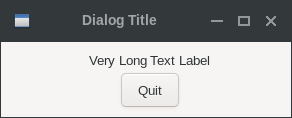
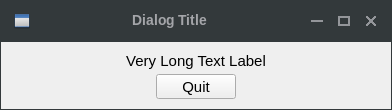
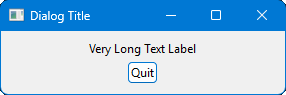
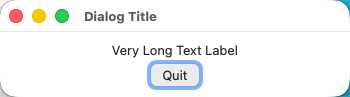
Very simple dialog with a label and a button. The application is closed when the button is pressed.
#include <iup.h>

int quit_cb(void)
{
  return IUP_CLOSE;
}

int main(int argc, char* argv[])
{
  Ihandle *dialog, *quit_bt, *vbox;

  IupOpen(&argc, &argv);

  /* Creating the button */
  quit_bt = IupButton("Quit", 0);
  IupSetCallback(quit_bt, "ACTION", (Icallback)quit_cb);

  /* the container with a label and the button */
  vbox = IupVbox(
           IupSetAttributes(IupLabel("Very Long Text Label"), "EXPAND=YES, ALIGNMENT=ACENTER"),
           quit_bt,
           0);
  IupSetAttribute(vbox, "MARGIN", "10x10");
  IupSetAttribute(vbox, "GAP", "5");
  IupSetAttribute(vbox, "ALIGNMENT", "ACENTER");

  /* Creating the dialog */
  dialog = IupDialog(vbox);
  IupSetAttribute(dialog, "TITLE", "Dialog Title");
  IupSetAttributeHandle(dialog, "DEFAULTESC", quit_bt);

  IupShow(dialog);

  IupMainLoop();

  IupDestroy(dialog);
  IupClose();

  return 0;
}| GTK | Qt | Win32 | macOS |
 |
 |
 |
 |
See Also
IupFileDlg, IupMessageDlg, IupDestroy, IupShowXY, IupShow, IupPopup, IupTray