IupParamBox
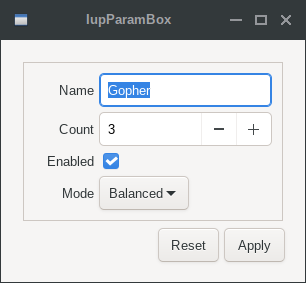
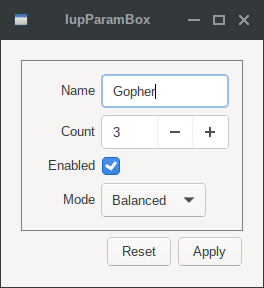
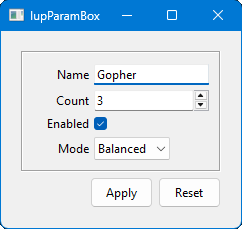
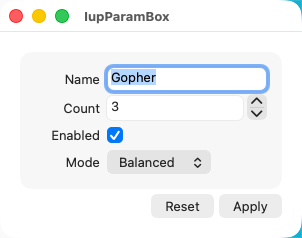
Creates a void container for composing elements created using a list of IupParam elements. Each param is used to create several lines of controls internally arranged in a vertical composition.
It does not have a native representation.
Creation
Ihandle* IupParamBox(Ihandle *param, ...);
Ihandle* IupParamBoxV(Ihandle* param, va_list arglist);
Ihandle* IupParamBoxv(Ihandle **param_array);param, ... : List of the IupParam identifiers that will be used to create the internal controls. NULL must be used to define the end of the list in C. It cannot be empty. The list of params cannot be changed after the box is created.
Returns: the identifier of the created element, or NULL if an error occurs.
Attributes
BUTTON1, BUTTON2, BUTTON3 (read-only): returns an IUP Ihandle* of the respective button in the button box. Returns NULL when the 'x' parameter has NOBUTTONS=YES.
PARAMid (read-only): returns an IUP Ihandle* representing the idth parameter, indexed by the declaration order, not counting separators or button names. id starts at 0.
PARAMCOUNT (read-only): returns the number of parameters not counting separators and button names.
STATUS (read-only): set to 1 when button1 is activated, and set to 0 when button2 is activated or the IupGetParam dialog close button is clicked.
LABELALIGN: controls the alignment of all labels. Can be ALEFT or ARIGHT. Default: "ALEFT".
MODIFIABLE: controls the active state of all controls but when disabled allows the text boxes to be read-only and selectable instead of inactive. Default: "YES".
SPINNING: defined only during the callback to indicate that the spin was activated.
USERDATA: will hold the user data passed to the callback.
EXPAND (non-inheritable*): The default value is "YES". See the documentation of the attribute for EXPAND inheritance.
WID (read-only): returns -1 if mapped.
FONT, CLIENTSIZE, CLIENTOFFSET, POSITION, MINSIZE, MAXSIZE, THEME: also accepted.
Callbacks
PARAM_CB: Action generated when a parameter is changed or a button is pressed.
int function(Ihandle* ih, int param_index, void* user_data);ih: identifier of the element that activated the
event.
param_index: current parameter being changed. Can have
negative values to indicate specific situations:
IUP_GETPARAM_BUTTON1 (-1) = if the user pressed the button 1;
IUP_GETPARAM_INIT (-2) = after the IupGetParam dialog
is mapped and just before it is shown. Not called when
IupParamBox is directly used;
IUP_GETPARAM_BUTTON2 (-3) = if the user pressed the button 2;
IUP_GETPARAM_BUTTON3 (-4) = if the user pressed the button 3, if
any;
IUP_GETPARAM_CLOSE (-5) = if the user clicked on the
IupGetParam dialog close button. Not called when
IupParamBox is directly used;
IUP_GETPARAM_MAP (-6) = before the IupGetParam dialog
is mapped. Not called when IupParamBox is directly
used;
user_data: a user pointer that is passed in the
function call.
Returns: 0 rejects the change or the button action, 1 accepts it. By default, buttons 1 and 2 will return IUP_CLOSE and close any modal dialog. To change that behavior return 0 in the callback.
The current parameter value must not be changed programmatically during the callback; other parameters can be changed.
PARAMid returns the parameter, not the actual control; the parameter attribute "CONTROL" returns the control. For example:
Ihandle* param2 = (Ihandle*)IupGetAttribute(ih, "PARAM2");
int value2 = IupGetInt(param2, IUP_VALUE);

Ihandle* param5 = (Ihandle*)IupGetAttribute(ih, "PARAM5");
Ihandle* ctrl5 = (Ihandle*)IupGetAttribute(param5, "CONTROL");

if (value2 == 0)
{
  IupSetAttribute(param5, IUP_VALUE, "New Value");
  IupSetAttribute(ctrl5, IUP_VALUE, "New Value");
}
Both the control value and the parameter value must be updated.
Programmatic changes are not filtered. The valuator, when available, can be retrieved using the parameter attribute "AUXCONTROL". The valuator is not automatically updated when the text box is changed programmatically. The parameter label is also available using the parameter attribute "LABEL".
Notes
The box cannot be dynamically filled using IupAppend or IupInsert.
Examples
| GTK | Qt | Win32 | macOS |
 |
 |
 |
 |