IupTray
Creates a system tray icon (also known as notification area icon or status icon). Allows the application to display an icon in the system tray with optional tooltip and context menu. Each tray icon should be destroyed using IupDestroy.
This control replaces the TRAY* attributes that were previously set directly on IupDialog.
Creation
Ihandle* IupTray(void);Returns: the identifier of the created element, or NULL if an error occurs.
Attributes
VISIBLE (non-inheritable): Shows or hides the tray icon. Can be "YES" or "NO". The tray icon is created on the first time VISIBLE is set to "YES".
IMAGE (non-inheritable): Image name for the tray icon. Use IupSetHandle or IupSetAttributeHandle to associate an image to a name. See also IupImage.
TIP (non-inheritable): Tooltip text displayed when the mouse hovers over the tray icon.
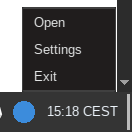
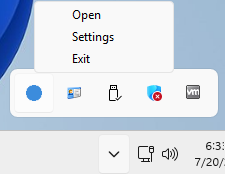
MENU (non-inheritable): Context menu displayed on
right-click. The value is a handle name associated with an IupMenu element. On Linux, MENU support depends
on the tray protocol: it is supported when using SNI
(StatusNotifierItem) via the dbusmenu protocol, but not supported when
using the legacy XEmbed protocol (GTK 3 and Motif with
xembed build tag in Go, or IUP_USE_XEMBED
option in CMake). When MENU is not supported, use the TRAYCLICK_CB
callback to detect right-clicks and call IupPopup manually to show a context
menu.
TITLE (non-inheritable): Reserved for future use.
Balloon Tooltip Attributes
These attributes are only supported in Windows (Win32 and WinUI).
TIPBALLOON (non-inheritable): Enables balloon-style tooltip instead of the standard tooltip.
TIPBALLOONTITLE (non-inheritable): Title text for the balloon tooltip.
TIPBALLOONTITLEICON (non-inheritable): Icon for the balloon tooltip title.
TIPDELAY (non-inheritable): Tooltip display timeout in milliseconds. Default: "10000".
Platform-Specific
TIPMARKUP [GTK XEmbed Only] (non-inheritable): Enables Pango markup in the tooltip text.
Callbacks
TRAYCLICK_CB: Called when the user clicks on the tray icon.
int function(Ihandle *ih, int button, int pressed, int dclick);ih: identifier of the element that activated the
event.
button: mouse button: 1=left, 2=middle, 3=right.
pressed: 1 if the button was pressed, 0 if
released.
dclick: 1 if it was a double-click, 0 otherwise.
Returns: IUP_CLOSE will be processed.
Notes
IupTray does not create a visible IUP element. It is a non-interactive control that interfaces with the operating system's system tray or notification area.
On Linux/Unix, two tray protocols are supported depending on the build configuration and driver:
- SNI (StatusNotifierItem): Used by GTK 4, Qt, FLTK, EFL, and optionally GTK 3 and Motif. Communicates via D-Bus and supports the MENU attribute via the dbusmenu protocol.
- XEmbed: Legacy protocol used by GTK 3 and Motif
when built with the
xembedbuild tag (Go) orIUP_USE_XEMBEDoption (CMake). Uses GtkStatusIcon (GTK) or X11 XEmbed protocol (Motif). Does not support the MENU attribute.
On Haiku the tray uses a Deskbar replicant. The executable must
export its Instantiate symbol; link with -Wl,-soname,_APP_
so Deskbar can dlopen the team and resolve the replicant
constructor.
Not supported on Android, iOS and WebAssembly (no system tray).
Examples
| GTK | Win32 | macOS |
 |
 |
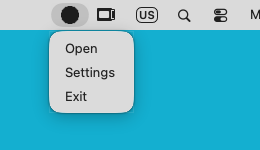 |
The tray icon with its MENU open. On GTK this uses the SNI protocol.