IupTable
Creates a Table control with columns and rows for displaying and editing tabular data. Unlike IupMatrix which is custom-drawn, IupTable uses native table/list widgets on each platform.
Creation
Ihandle* IupTable(void);Returns: the identifier of the created element, or NULL if an error occurs.
Attributes
Dimensions
NUMLIN (non-inheritable): Number of data rows in the table. Can be changed after creation to add or remove rows at the end. Removed rows lose their values and attributes.
NUMCOL (non-inheritable): Number of columns in the table. Can be changed after creation to add or remove columns at the end. Removed columns lose their titles, values and attributes.
COUNT (read-only) (non-inheritable): Returns the total number of cells (NUMLIN * NUMCOL).
Structure Operations
ADDLIN (write-only) (non-inheritable): Adds a new row at the given position. Value is the 1-based line index where the row will be inserted.
DELLIN (write-only) (non-inheritable): Deletes the row at the given position. Value is the 1-based line index to remove.
ADDCOL (write-only) (non-inheritable): Adds a new column at the given position. Value is the 1-based column index where the column will be inserted.
DELCOL (write-only) (non-inheritable): Deletes the column at the given position. Value is the 1-based column index to remove.
The rows or columns after the given position move with their values, titles and attributes (ALIGNMENTcol, WIDTHcol, RASTERWIDTHcol, EDITABLEcol, and BGCOLOR, FGCOLOR and FONT of lines, columns and cells). The focused cell, the selected lines and SORTSIGNcol move with them too. When the focused line or column is removed, the focus goes to the one now at that position, or to the last one. A removed line leaves the selection, no other line is selected in its place. The same applies to lines and columns removed by NUMLIN and NUMCOL. No callback is called.
Cell Values
IDVALUElin:col: Gets or sets the text value of a cell. Uses L:C notation where L is the 1-based line and C is the 1-based column.
VALUE (non-inheritable): Gets or sets the value of the currently focused cell.
Column Attributes (using column ID, 1-based)
TITLEcol (non-inheritable): Column header text. n starts at 1.
WIDTHcol (non-inheritable): Column width in pixels. n starts at 1.
RASTERWIDTHcol (non-inheritable): Same as WIDTHcol.
SORTSIGNcol (non-inheritable): Shows a sort sign in the column header. Can be "UP" (ascending), "DOWN" (descending) or "NO". Default: NO. The sign is the native sort arrow of each driver, its direction for the same order can differ between drivers. Only one column shows the sign, setting it in a column clears it in the others. It only draws the sign, the rows are not sorted. n starts at 1.
ALIGNMENTcol (non-inheritable): Column text alignment. Can be "ALEFT", "ACENTER" or "ARIGHT". Default: "ALEFT". n starts at 1.
Selection and Focus
FOCUSCELL (non-inheritable): Gets or sets the focused cell in "L:C" format. Supports partial syntax: "2:" changes only the line, ":3" changes only the column. Setting it selects only that line, unless SELECTIONMODE=NONE, and scrolls the cell into view. No callback is called. When retrieved but no cell has the focus it returns "1:1", or "0:0" if the table has no lines or no columns. Default: "1:1".
SELECTIONMODE (non-inheritable): Selection mode. Can be "NONE", "SINGLE", "MULTIPLE" or "CELLS". Default: "SINGLE". CELLS selects one rectangular range of cells, see SELECTEDCELLS.
SELECTEDCELLS (non-inheritable): Gets or sets the selected cell range in "L1:C1-L2:C2" format, top-left and bottom-right cells. The focus cell is the anchor of the range; drag, Shift+click, Shift+arrows and Ctrl+A (Cmd+A on macOS, Alt+A on Haiku) extend it. On Android and iOS a long press outside the range extends it. Setting it moves the focus cell to L1:C1. No callback is called. Returns NULL when SELECTIONMODE is not CELLS or the table has no lines or columns.
SELECTEDlin (non-inheritable): Gets or sets the selection state of a line. Can be "YES" or "NO". lin starts at 1. Setting it is ignored when SELECTIONMODE=NONE or CELLS.
SELECTEDLINES (non-inheritable): Gets or sets the selection state of all lines, as a sequence of "+" and "-" symbols, one per line. Can be set only when SELECTIONMODE=MULTIPLE, a string shorter than NUMLIN leaves the remaining lines unchanged. When SELECTIONMODE=CELLS it returns the lines covered by the selected range. Returns NULL when the table has no lines.
Display
SHOWGRID (non-inheritable): Shows grid lines between cells. Can be "YES" or "NO". Default: "YES".
FOCUSRECT (non-inheritable): Draws a dashed focus rectangle around the focused cell. Can be "YES" or "NO". Default: "YES".
SHOW (write-only): Scrolls the table to make the specified cell visible. Value is in "L:C" format.
REDRAW (write-only): Forces the table to refresh its display. In VIRTUALMODE it re-queries VALUE_CB (and IMAGE_CB) for the visible cells.
Editing
EDITABLE (non-inheritable): Enables in-place editing for all cells. Can be "YES" or "NO".
EDITABLEcol (non-inheritable): Enables in-place editing for a specific column. n starts at 1.
Colors
BGCOLOR: Background color.
BGCOLORL:C sets one cell, BGCOLORL:0 one line
and BGCOLOR0:C one column. When more than one applies to
the same cell the precedence is per-cell, then per-column, then
per-line. A change on a mapped table is displayed immediately.
FGCOLOR: Foreground text
color. Same L:C, L:0 and 0:C
notation as BGCOLOR.
FONT: Text font. Same
L:C, L:0 and 0:C notation as
BGCOLOR.
ALTERNATECOLOR (non-inheritable): Enables alternating row background colors. Can be "YES" or "NO". Default: "NO".
EVENROWCOLOR (non-inheritable): Background color for even-numbered rows. Only used when ALTERNATECOLOR=YES.
ODDROWCOLOR (non-inheritable): Background color for odd-numbered rows. Only used when ALTERNATECOLOR=YES.
Behavior
SORTABLE (non-inheritable): Enables column sorting when the user clicks on a column header. Can be "YES" or "NO". Default: "NO". A click toggles the direction and shows an arrow in that column header. The sort is stable and renumbers the lines: line 1 is the top line afterwards. The per-line and per-cell attributes, the focused cell and the selected lines move with their rows, no callback is called. Setting it to NO removes the arrow and SORTSIGN returns NO for every column. In virtual mode the rows are not sorted, the application must sort its own data from SORT_CB.
ALLOWREORDER (non-inheritable): Enables column reordering via drag-and-drop on the header. The dragged column moves to the drop position and the columns in between shift by one. After the move, column number n is the column shown at position n: cell values, column and cell attributes and callbacks all use the new numbering. Can be "YES" or "NO". Default: "NO".
SHOWDRAGDROP (creation-only) (non-inheritable): enables the interactive reordering of rows by dragging, and enables the DRAGDROP_CB callback. Can be "YES" or "NO". Default: "NO".
Drag & Drop attributes and callbacks are supported, but SHOWDRAGDROP must be set to NO.
USERRESIZE (non-inheritable): Enables user column resizing by dragging the header dividers. Can be "YES" or "NO". Default: "NO".
STRETCHLAST (non-inheritable): The last column stretches to fill the remaining table width. Can be "YES" or "NO". Default: "YES".
Virtual Mode
VIRTUALMODE (non-inheritable): Enables virtual mode
for large datasets. When enabled, cell values are not stored internally
but retrieved on demand via VALUE_CB. Reading L:C or VALUE
returns the text VALUE_CB returns for that cell. Can be "YES" or "NO".
Default: "NO". Must be set before the control is mapped.
Images
SHOWIMAGE (non-inheritable): Enables per-cell image display. Can be "YES" or "NO". Default: "NO". Must be set before the control is mapped.
FITIMAGE (non-inheritable): Scales images to fit the row height. Can be "YES" or "NO". Default: "YES".
IMAGElin:col (write-only) (non-inheritable): Sets the image for a cell. Uses L:C notation. The value is an image name set with IupSetHandle.
Natural Size
VISIBLECOLUMNS: Number of columns shown. Defines the natural width and limits it, the table is not stretched wider unless EXPAND is set. When not set, all columns are used (capped at the actual column count) and the table fills the available width. It counts table columns, while in IupList the same attribute counts characters.
VISIBLELINES: Number of data rows shown. Defines the natural height and limits it, the table is not stretched taller unless EXPAND is set. When not set, a default of 8 rows is used and the table fills the available height.
ACTIVE, EXPAND, FONT, SCREENPOSITION, POSITION, MINSIZE, MAXSIZE, WID, TIP, SIZE, RASTERSIZE, ZORDER, VISIBLE, THEME: also accepted.
The default value of EXPAND is "YES".
Callbacks
CLICK_CB: Action generated when the user clicks on a cell.
int function(Ihandle *ih, int lin, int col, char *status);ih: identifier of the element that activated the
event.
lin: line number (1-based).
col: column number (1-based).
status: status of the mouse buttons and some keyboard
keys at the moment the event is generated.
Returns: IUP_IGNORE to suppress default handling.
RIGHTCLICK_CB: Action generated when the right mouse button is pressed over a cell. The focus cell is moved to the clicked cell before the callback is called; a selected cell range is kept. On Android and iOS it is generated by a long press on a cell inside the selected range, or on any cell when SELECTIONMODE is not CELLS. Not generated on Android and iOS when SHOWDRAGDROP=YES.
int function(Ihandle *ih, int lin, int col);ih: identifier of the element that activated the
event.
lin: line number (1-based).
col: column number (1-based).
ENTERITEM_CB: Action generated when the focus cell changes.
int function(Ihandle *ih, int lin, int col);ih: identifier of the element that activated the
event.
lin: new focus line (1-based).
col: new focus column (1-based).
MULTISELECTION_CB: Action generated when the selection changes and SELECTIONMODE=MULTIPLE.
int function(Ihandle *ih, int *lin, int n);ih: identifier of the element that activated the
event.
lin: array of the selected lines (1-based), in
ascending order.
n: number of selected lines, 0 when the selection was
cleared.
The array is valid only during the callback. Not called when the selection is changed by SELECTEDlin or SELECTEDLINES.
CELLSELECTION_CB: Action generated when the selected cell range changes and SELECTIONMODE=CELLS.
int function(Ihandle *ih, int lin1, int col1, int lin2, int col2);ih: identifier of the element that activated the
event.
lin1, col1: top-left cell of the range
(1-based).
lin2, col2: bottom-right cell of the
range (1-based).
Not called when the range is changed by SELECTEDCELLS or FOCUSCELL.
SORT_CB: Action generated when the user clicks a column header with SORTABLE=YES.
int function(Ihandle *ih, int col);ih: identifier of the element that activated the
event.
col: column number (1-based).
Returns: IUP_IGNORE to suppress the sort operation. When the sort is suppressed the sign is not updated, an application that sorts its own rows sets SORTSIGNcol. The rows and the arrow are left unchanged.
REORDER_CB: Callback called when the user reorders a column by dragging it to a new position. Called only when ALLOWREORDER=YES.
int function(Ihandle *ih, int old_pos, int new_pos);ih: identifier of the element that activated the
event.
old_pos: the original column position before the
reorder (1-based).
new_pos: the new column position after the reorder
(1-based).
Returns: if IUP_IGNORE is returned the reorder is rejected and the column returns to its original position. It is called before the columns are renumbered.
DRAGDROP_CB: Callback called when the user reorders a row by dragging it. Called only when SHOWDRAGDROP=YES.
int function(Ihandle *ih, int drag_id, int drop_id, int isshift, int iscontrol);ih: identifier of the element that activated the
event.
drag_id: the original row position where the drag
started (1-based).
drop_id: the row position where the drop was executed
(1-based). -1 indicates a drop in a blank area.
isshift: flag indicating the shift key state.
iscontrol: flag indicating the control key state.
Returns: if IUP_CONTINUE is returned, or if the callback is not defined and SHOWDRAGDROP=YES, then the row is moved to the new position.
VALUECHANGED_CB: Called after a cell value was changed.
int function(Ihandle *ih, int lin, int col);ih: identifier of the element that activated the
event.
lin: line number (1-based).
col: column number (1-based).
EDITBEGIN_CB: Called when a cell is about to enter edit mode.
int function(Ihandle *ih, int lin, int col);ih: identifier of the element that activated the
event.
lin: line number (1-based).
col: column number (1-based).
Returns: IUP_IGNORE to block editing.
EDITEND_CB: Called when cell editing ends.
int function(Ihandle *ih, int lin, int col, char *new_value, int apply);ih: identifier of the element that activated the
event.
lin: line number (1-based).
col: column number (1-based).
new_value: the new text value entered by the
user.
apply: 1 if the user accepted the edit (Enter), 0 if
cancelled (Escape).
Returns: IUP_IGNORE to reject the edit and keep the old value.
EDITION_CB: Called while the user is editing a cell, on each text change.
int function(Ihandle *ih, int lin, int col, char *new_text);ih: identifier of the element that activated the
event.
lin: line number (1-based).
col: column number (1-based).
new_text: the current text in the editor.
Returns: IUP_IGNORE to prevent the text update.
VALUE_CB: Called to retrieve the cell value in virtual mode.
char* function(Ihandle *ih, int lin, int col);ih: identifier of the element that activated the
event.
lin: line number (1-based).
col: column number (1-based).
Returns: the string value to display in the cell.
IMAGE_CB: Called to retrieve the cell image in virtual mode.
char* function(Ihandle *ih, int lin, int col);ih: identifier of the element that activated the
event.
lin: line number (1-based).
col: column number (1-based).
Returns: the image name to display in the cell.
MAP_CB, UNMAP_CB, DESTROY_CB, GETFOCUS_CB, KILLFOCUS_CB, ENTERWINDOW_CB, LEAVEWINDOW_CB, K_ANY, HELP_CB: All common callbacks are supported.
Notes
Column and line indices are 1-based throughout the IupTable API.
In Motif, column reordering (ALLOWREORDER) and user column resizing (USERRESIZE) are not supported.
In virtual mode, the table does not store cell values internally. Instead, it calls VALUE_CB (and optionally IMAGE_CB) to retrieve the data to display. This is efficient for very large datasets where storing all values would be impractical. The application is responsible for maintaining the actual data.
Examples
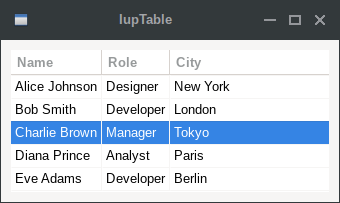
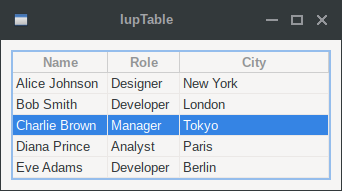
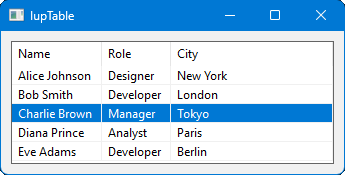
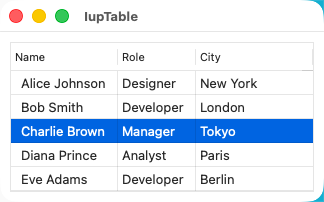
| GTK | Qt | Win32 | macOS |
 |
 |
 |
 |