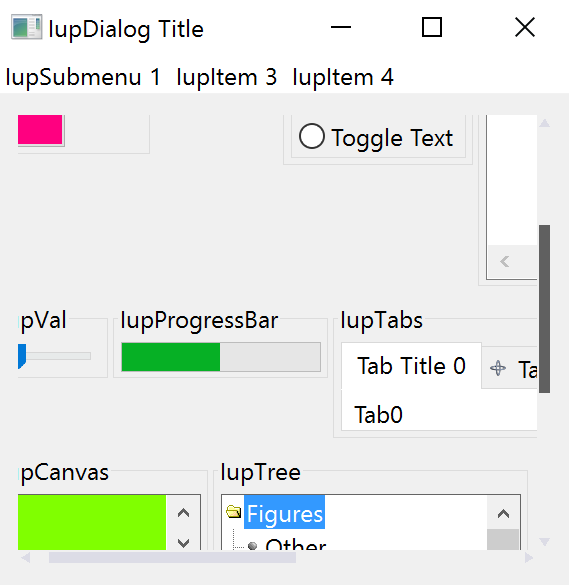
IupFlatScrollBox
Creates a native container that allows its child to be scrolled. It inherits from IupCanvas. The difference from IupScrollBox is that its scrollbars are drawn.
Initialization and Usage
The IupControlsOpen function must be called after
IupOpen. The "iupcontrols.h" file must also be included
in the source code. The program must be linked to the controls library
(iupctrl). In Go it needs the ctrl build tag.
Creation
Ihandle* IupFlatScrollBox(Ihandle* child);child: Identifier of an interface element which will receive the box. It can be NULL.
Returns: the identifier of the created element, or NULL if an error occurs.
Attributes
Inherits all attributes and callbacks of the IupCanvas, but redefines a few attributes.
BGCOLOR: will always use the background color of the native parent.
BORDER (creation-only): it is always "NO".
CANFOCUS: is set to NO.
CANVASBOX (non-inheritable): enable the behavior of a canvas box instead of a regular container. This will affect the EXPAND attribute, the Natural size computation, and child layout distribution. Can be YES or NO. Default: NO.
CHILDOFFSET: Allow specifying a position offset for the child. Available for native containers only. It will not affect the natural size, and allows to position controls outside the client area. Format "dxxdy", where dx and dy are integer values corresponding to the horizontal and vertical offsets, respectively, in pixels. Default: 0x0.
EXPAND (non-inheritable): The default value is "YES".
LAYOUTDRAG (non-inheritable): When the scrollbar is moved, automatically update the children layout. Default: YES. If set to NO then the layout will be updated only when the mouse drag is released.
SCROLLBAR (read-only): is always "NO". So the IupCanvas native scrollbars are hidden. See the FLATSCROLLBAR attribute below. YAUTOHIDE and XAUTOHIDE will be always YES.
SCROLLTO (write-only): position the scroll at the given x,y coordinates relative to the box top-left corner. Format "x,y". Value can also be TOP or BOTTOM for a vertical scroll to the top or to the bottom of the scroll range.
SCROLLTOCHILD (write-only): position the scroll at the top-left corner of the given child located by its name. Use IupSetHandle or IupSetAttributeHandle to associate an Ihandle* to a name. The child must be contained in the Scrollbox hierarchy.
SCROLLTOCHILD_HANDLE (write-only): same as SCROLLTOCHILD but directly using the child handle.
FLATSCROLLBAR: Can be YES, Vertical or Horizontal. Can be set only before map. Default: YES.
WHEELDROPFOCUS: set to YES.
Scrollbars Appearance Attributes
See FLATSCROLLBAR.
CLIENTSIZE, CLIENTOFFSET: also accepted.
Callbacks
LAYOUTUPDATE_CB: Action generated when the layout is updated after a scroll operation.
Notes
The box allows the application to create a virtual space for the dialog that is actually larger than the visible area. The current size of the box defines the visible area. The natural size of the child (and its children) defines the virtual space size.
So the IupFlatScrollBox does not depend on its child's size or expansion, and its natural size is always 0x0, except for the first time when it expands to the child's natural size.
The user can move the box contents by dragging the background. Also, the mouse wheel scrolls the contents vertically.
The box can be created with no elements and be dynamic filled using IupAppend or IupInsert.
Notice that it is possible to use the IupFlatScrollBox to overcome the internal scrollbars of another control like IupMatrix by making all cells visible, but this will force all cells to be drawn all the time even when not visible at the scroll box, which is much slower than the internal IupMatrix optimization.
Examples