IupPopover
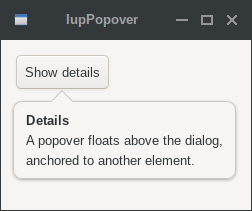
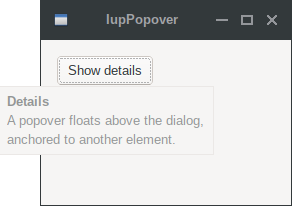
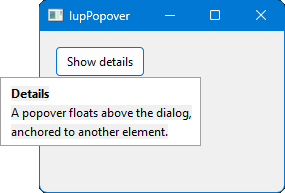
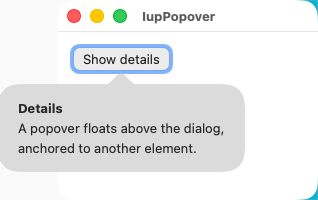
Creates a Popover container. It is a floating container that displays content anchored to another element. The popover is shown and hidden by setting the VISIBLE attribute.
Creation
Ihandle* IupPopover(Ihandle* child);child: identifier of an interface element that will be displayed inside the popover. It can be NULL.
Returns: the identifier of the created element, or NULL if an error occurs.
Attributes
ANCHOR (non-inheritable): The element the popover is anchored to. Must be set before the popover is mapped. Use IupSetAttributeHandle to associate the anchor element.
ARROW (non-inheritable): Shows an arrow pointing to the anchor element. Can be "YES" or "NO". Default: "YES". Only supported in GTK 4 and WebAssembly. In GTK 3 and macOS the arrow is always shown. In other systems the popover is displayed without an arrow.
AUTOHIDE (non-inheritable): When enabled, the popover is automatically hidden when the user clicks outside of it, when focus leaves, or when the Esc key is pressed. A click on the anchor element does not trigger auto-hide, so the anchor callback decides whether to hide the popover. In GTK 3, Qt and Motif the click hides the popover and is consumed, so it does not reach the anchor. Can be "YES" or "NO". Default: "YES".
POSITION (non-inheritable): The position of the popover relative to the anchor element. Can be "BOTTOM", "TOP", "LEFT", "RIGHT", "BOTTOMLEFT", "BOTTOMRIGHT", "TOPLEFT", "TOPRIGHT", "LEFTBOTTOM", "LEFTTOP", "RIGHTBOTTOM" or "RIGHTTOP". Default: "BOTTOM".
The basic values (BOTTOM, TOP, LEFT, RIGHT) center the popover along the anchor edge. The compound values specify both the edge and the alignment: the first word is the edge where the popover appears, the second word is the alignment along that edge. For example, "BOTTOMLEFT" places the popover below the anchor with left edges aligned, and "RIGHTTOP" places it to the right with top edges aligned.
In WinUI all positions map directly to native FlyoutPlacementMode, in GTK 4 to the native popover alignment. In GTK 3 the edge-aligned positions are approximated using the native popover positioning with offsets. In other systems the positions are calculated manually.
OFFSETX (non-inheritable): Horizontal pixel offset added to the computed popover position. Can be positive or negative. Default: "0". In macOS the offset is applied only while the resulting position stays inside the dialog.
OFFSETY (non-inheritable): Vertical pixel offset added to the computed popover position. Can be positive or negative. Default: "0". In macOS the offset is applied only while the resulting position stays inside the dialog.
AUTOFLIP (non-inheritable): When enabled, the popover automatically flips to the opposite side if it would extend beyond the screen boundaries. The alignment is preserved when flipping (e.g. BOTTOMLEFT flips to TOPLEFT). Can be "YES" or "NO". Default: "YES". Only affects Win32, Qt, FLTK, EFL, Motif, Android and Haiku. In GTK 3 the native popover flips at window boundaries. In GTK 4, WinUI and macOS the native popover flips at screen boundaries. In all native cases auto-flip is always enabled and this attribute has no effect.
VISIBLE (non-inheritable): Shows or hides the popover. The popover is mapped on the first time VISIBLE is set to "YES". The ANCHOR element must be set and mapped before showing the popover.
ACTIVE, FONT, SCREENPOSITION, POSITION, MINSIZE, MAXSIZE, WID, TIP, SIZE, RASTERSIZE, ZORDER, THEME: also accepted.
Callbacks
SHOW_CB: Called when the popover is shown or hidden.
int function(Ihandle *ih, int state);ih: identifier of the element that activated the
event.
state: IUP_SHOW (1) when the popover becomes visible,
IUP_HIDE (0) when it is hidden.
MAP_CB, UNMAP_CB, DESTROY_CB, K_ANY: common callbacks are supported.
Notes
The popover uses the child's natural size to determine its own size. It does not expand and accepts exactly one child element. In GTK 3 a popover larger than the dialog is clipped to it.
The ANCHOR attribute must be set before mapping, and the anchor element must already be mapped when the popover is first shown.
When AUTOHIDE=YES, the popover behaves like a modal popup that closes on outside interaction. When AUTOHIDE=NO, the popover remains visible until explicitly hidden via VISIBLE=NO.
Examples
| GTK | Qt | Win32 | macOS |
 |
 |
 |
 |