IupTree
Creates a tree containing nodes of branches or leaves. Both branches and leaves can have an associated text and image.
The branches can be expanded or collapsed. When a branch is expanded, its immediate children are visible, and when it is collapsed they are hidden.
The leaves can generate an "executed" or "renamed" actions, branches can only generate a "renamed" action.
The focus node is the node with the focus rectangle, marked nodes have their background inverted.
Creation
Ihandle* IupTree(void); Returns: the identifier of the created element, or NULL if an error occurs.
Attributes
General
AUTOREDRAW, BGCOLOR, COUNT, EXPAND, FGCOLOR, INDENTATION, RASTERSIZE, SPACING, TOPITEM, VISIBLECOLUMNS, VISIBLELINES
Expanders
HIDELINES, HIDEBUTTONS
Nodes
CHILDCOUNT, TOTALCHILDCOUNT, COLOR, DEPTH, KIND, PARENT, STATE, TITLE, TITLEFONT, USERDATA
Toggle
SHOWTOGGLE, EMPTYAS3STATE, TOGGLEVALUE, TOGGLEVISIBLE
Images
IMAGE, IMAGEEXPANDED, IMAGELEAF, IMAGEBRANCHCOLLAPSED, IMAGEBRANCHEXPANDED
Focus
VALUE, CANFOCUS, PROPAGATEFOCUS
Marks
MARK, MARKED, MARKEDNODES, MARKMODE, MARKSTART, MARKWHENTOGGLE
Hierarchy
ADDEXPANDED, ADDROOT, ADDLEAF, ADDBRANCH, COPYNODE, DELNODE, EXPANDALL, INSERTLEAF, INSERTBRANCH, MOVENODE
Editing
RENAME, RENAMECARET, RENAMESELECTION, SHOWRENAME
Drag&Drop
DRAGDROPTREE, DROPFILESTARGET, DROPEQUALDRAG, SHOWDRAGDROP
Callbacks
SELECTION_CB: Action generated when an node is
selected or deselected.
MULTISELECTION_CB: Action generated when multiple nodes
are selected with the mouse and the shift key pressed.
MULTIUNSELECTION_CB: Action generated before multiple
nodes are unselected in one single operation.
BRANCHOPEN_CB: Action generated when a branch is
expanded.
BRANCHCLOSE_CB: Action generated when a branch is
collapsed.
EXECUTELEAF_CB: Action generated when a leaf is
executed.
EXECUTEBRANCH_CB: Action generated when a branch is
executed.
SHOWRENAME_CB: Action generated before a node is
renamed.
RENAME_CB: Action generated after a node is
renamed.
DRAGDROP_CB: Action generated when an internal drag
& drop is executed.
NODEREMOVED_CB: Action generated when a node is about
to be removed.
RIGHTCLICK_CB: Action generated when the right mouse
button is pressed over a node.
TOGGLEVALUE_CB: Action generated when the toggle's
state was changed. The callback also receives the new toggle's
state.
CONTEXTMENU [macOS Only] (non-inheritable): Sets a custom context (right-click) menu for the control. The value is an IUP menu handle. Set to a menu handle to replace the default system context menu, or set to NULL to disable the context menu entirely. If never set, the default system context menu is shown.
Drag & Drop attributes and callbacks are supported, but SHOWDRAGDROP must be set to NO.
Notes
Hierarchy
Branches can contain other branches or leaves. When ADDROOT=YES, the tree has initially one branch, the root. The first node always has id=0 and depth=0. The tree nodes have a sequential identification number (id), starting by the first, with id=0, and increases for each node independent of the node depth. The following picture illustrates the numbering of the nodes in a tree.
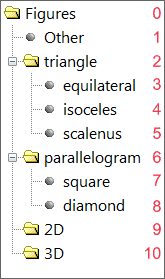
Tree nodes and Ids
Since you have to add each node, the creation of this tree can be done in several ways because the action attributes ADD* and INSERT* use an existent node to position the new node. The following pseudocode initializes the tree from top to bottom sequentially:
TITLE0 = "Figures"
  ADDLEAF0 = "Other"    // Use the previous node as reference
  ADDBRANCH1 = "triangle"
    ADDLEAF2 = "equilateral"
    ADDLEAF3 = "isoceles"
    ADDLEAF4 = "scalenus"
  INSERTBRANCH2 = "parallelogram"  // Use the previous node at the same depth as reference
    ADDLEAF6 = "square"
    ADDLEAF7 = "diamond"
  INSERTBRANCH6 = "2D"
  INSERTBRANCH9 = "3D"
The following pseudo code initializes the tree from bottom to top sequentially (except for branches), and also uses the focus node:
VALUE = 0  // Set the focus node at the first (default for a new element)
TITLE = "Figures"
ADDBRANCH = "3D"
ADDBRANCH = "2D"
ADDBRANCH = "parallelogram"
ADDLEAF1 = "diamond"
ADDLEAF1 = "square"
ADDBRANCH = "triangle"
ADDLEAF1 = "scalene"
ADDLEAF1 = "isosceles"
ADDLEAF1 = "equilateral"
ADDLEAF = "Other"
Notice that in both cases, the initialization of the tree is highly dependent on the order of the operations. Currently, we cannot guarantee the order before mapping to the native system, so the initialization must be performed after the tree is mapped.
Scrollbars are automatically displayed if the tree is greater than its display area.
The first node added to an empty tree will always be the focus node.
Manipulation
Node insertion or removal is done by means of attributes. It is allowed to remove nodes and branches inside callbacks associated to opening or closing branches.
This means that the user may insert nodes and branches only when necessary when the parent branch is opened, allowing the use of a larger IupTree without too much overhead. Then when the parent branch is closed, the subtree can be removed. But the subtree must have at least 1 node, so the branch can be opened and closed, empty branches cannot be opened.
User Data
The node id does not always correspond to the same node as the tree is modified. For example, an id=2 will always refer to the third node in the tree, so if you add a node before the third node, the node with id=2 will now refer to the new node, and the old node will now have id=3. For that reason, each node can store an user data pointer uniquely identifying the node. To set or retrieve the user data of a node use the USERDATAid attribute, or the Extra Functions below to associate a user data to a node and to find a node given its user data.
Images
IupTree has three types of images: one associated to the leaf, one to the collapsed branch and the other to the expanded branch. Each image can be changed, both globally and individually.
The predefined images used in IupTree can be obtained by means of function IupGetHandle. The names of the predefined images are: IMGLEAF, IMGCOLLAPSED, IMGEXPANDED, IMGBLANK (blank sheet of paper) and IMGPAPER (written sheet of paper). By default:
"IMAGELEAF" uses "IMGLEAF"
"IMAGEBRANCHCOLLAPSED" uses "IMGCOLLAPSED"
"IMAGEBRANCHEXPANDED" uses "IMGEXPANDED"

"IMGBLANK" and "IMGPAPER" are designed for use as "IMAGELEAF"
In Windows, IMAGELEAF, IMAGEBRANCHCOLLAPSED and IMAGEBRANCHEXPANDED must have the same size. In other systems only IMAGEBRANCHCOLLAPSED and IMAGEBRANCHEXPANDED must have the same size. In Windows, IMAGELEAF defines the size available for the image on all nodes.
IMGEMPTY can be used as branches or leafs to clear the image (a totally transparent image).
Simple Marking
It is the default operation mode (MARKMODE=SINGLE). In this mode, only one node can be selected.
Multiple Marking
IupTree allows marking several nodes simultaneously using the Shift and Control keys. To use multiple marking set MARKMODE=MULTIPLE. In GTK, GTK 4 and Qt, when MARKMODE=MULTIPLE multiple nodes can also be selected using a rubber band, controlled by the RUBBERBAND attribute. In GTK this requires SHOWDRAGDROP=NO.
When a user keeps the Control key pressed, the individual marking mode is used. This way, the focus node can be modified without changing the marked node. To reverse a node marking, the user simply has to press the space bar.
When the user keeps the Shift key pressed, the block marking mode is used. This way, all nodes between the focus node and the initial node are marked, and all others are unmarked. The initial node is changed every time a node is marked without the Shift key being pressed. This happens when any movement is done without Shift or Control keys being pressed, or when the space bar is pressed together with Control.
Navigation
Using the keyboard:
- Arrow Up/Down: Moves the focus node to the neighbor node, according to the arrow direction. If Shift is pressed and MARKMODE= MULTIPLE, a continuous range of cells is selected.
- Home/End: Moves the focus node to the first/last node.
- Page Up/Page Down: Moves the focus node to the node one visible page above/below the focus node.
- Enter: If the focus node is an expanded branch, it is collapsed; if it is a collapsed branch, it is expanded; if it is a leaf, it is executed.
- Ctrl+Arrow Up/Down: Moves only the focus node.
- Ctrl+Space: Marks or unmark the node at focus.
- F2: Calls the rename callback or invoke the in place rename.
- Esc: cancels in place rename.
In Motif when pressing Tab, the focus goes to the next visible node, if there is no next visible node, then the next control in the dialog receives the focus. In other drivers, the focus simply goes directly to the next control.
Using the left mouse button:
- Clicking a node: Moves the focus node to the clicked node.
- Clicking a (-/+) box: Makes the branch to the right of the (-/+) box collapse/expand.
- Double-clicking a node: Moves the focus node to the clicked node. If the node is an expanded branch, it is collapsed; if it is a collapsed branch, it is expanded; if it is a leaf, it is executed.
- Clicking twice a node: Calls the rename callback or invoke the in place rename.
- Clicking and dragging a node: if SHOWDRAGDROP=YES starts a drag. When mouse is released, the DRAGDROP_CB callback is called. If the callback does not exist or if it returns IUP_CONTINUE then the node is moved to the new position. If Ctrl is pressed then the node is copied instead of moved.
Removing a Node with "Del"
By default, the Del key is not processed, but you can implement it using a simple K_ANY callback:
int k_any(Ihandle* ih, int c)
{
  if (c == K_DEL)
   IupSetAttribute(ih,"DELNODE","MARKED");
  return IUP_CONTINUE;
}
Extra Functions
IupTree has functions that allow associating a pointer (or a user defined id) to a node. In order to do that, you provide the id of the node and the pointer (userid); even if the node's id changes later on, the userid will still be associated with the given node.
IupTree shares the same functions with IupFlatTree.
int IupTreeSetUserId(Ihandle *ih, int id, void *userid);ih: Identifier of the interface element.
id: Node identifier.
userid: User pointer to be associated with the node.
Use NULL (nil) value to remove the association.
Returns a non-zero value if the node was found.
Associates an userid with a given id. If the id of the node is changed, the userid remains the same.
void* IupTreeGetUserId(Ihandle *ih, int id); ih: Identifier of the interface element.
id: Node identifier.
Returns the pointer associated to the node or NULL if none was associated. SetUserId must have been called for the node with the given id.
int IupTreeGetId(Ihandle *ih, void *userid); ih: Identifier of the interface element.
userid: Pointer associated to the node.
Returns the id of the node that has the userid on success or -1 (nil) if not found. SetUserId must have been called with the same userid.
Utility Functions
These functions can be used to set and get attributes from the element:
void  IupSetAttributeId(Ihandle *ih, const char* name, int id, const char* value);
char* IupGetAttributeId(Ihandle *ih, const char* name, int id);
int   IupGetIntId(Ihandle *ih, const char* name, int id);
float IupGetFloatId(Ihandle *ih, const char* name, int id);
void  IupSetfAttributeId(Ihandle *ih, const char* name, int id, const char* format, ...);
void  IupSetIntId(Ihandle* ih, const char* name, int id, int value);
void  IupSetFloatId(Ihandle* ih, const char* name, int id, float value);
They work just like the respective traditional set and get functions. But the attribute string is complemented with the id value. For ex:
IupSetAttributeId(ih, "KIND", 30, value) == IupSetAttribute(ih, "KIND30", value)
IupSetAttributeId(ih, "ADDLEAF", 10, value) == IupSetAttribute(ih, "ADDLEAF10", value)
But these functions are faster than the traditional functions because they do not need to parse the attribute name string and the application does not need to concatenate the attribute name with the id.
Examples
| GTK | Qt | Win32 | macOS |
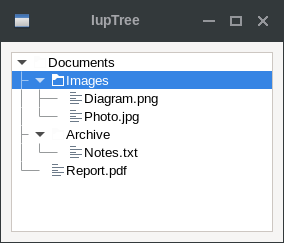 |
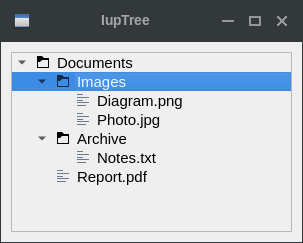 |
 |
 |