IupText
Creates an editable text field.
Creation
Ihandle* IupText(void);Returns: the identifier of the created element, or NULL if an error occurs.
Attributes
ALIGNMENT (non-inheritable): horizontal text alignment. Possible values: "ALEFT", "ARIGHT", "ACENTER". Default: "ALEFT". Not supported in Motif and FLTK.
APPEND (write-only): Inserts a text at the end of the current text. In the Multiline, if APPENDNEWLINE=YES, a "\n" character is automatically inserted before the appended text if the current text is not empty(APPENDNEWLINE default is YES). If APPENDSCROLL=YES, after the insert the view scrolls so the appended text is visible (APPENDSCROLL default is YES). Ignored if set before map.
BGCOLOR: Background color of the text. Default: the global attribute TXTBGCOLOR. Ignored in GTK when MULTILINE=NO.
BORDER (creation-only): Shows a border around the text. Default: "YES".
CANFOCUS (creation-only) (non-inheritable): enables the focus traversal of the control. In Windows the control will still get the focus when clicked. Default: YES.
PROPAGATEFOCUS(non-inheritable): enables the focus callback forwarding to the next native parent with FOCUS_CB defined. Default: NO.
CARET (non-inheritable): Character position of the insertion point. Its format depends in MULTILINE=YES. The first position, lin or col, is "1".
For multiple lines: a string with the "lin,col" format, where lin and col are integer numbers corresponding to the caret's position.
For single line: a string in the "col" format, where col is an integer number corresponding to the caret's position.
When lin is greater than the number of lines, the caret is placed at the last line. When col is greater than the number of characters in the given line, the caret is placed after the last character of the line.
If the caret is not visible the text is scrolled to make it visible.
In Windows, if the element does not have the focus, the returned value is the position of the first character of the current selection. The caret is only displayed if the element has the keyboard focus, but its position can be changed even if not visible. When changed, it will also change the selection, but the text will be scrolled only when it receives the focus.
See the Notes below if using UTF-8 strings in GTK.
CARETPOS (non-inheritable): Also the character position of the insertion point, but using a zero based character unique index "pos". Useful for indexing the VALUE string. See the Notes below if using UTF-8 strings in GTK.
CHANGECASE (non-inheritable): Change case according to given conversion. Can be UPPER, LOWER, TOGGLE, or TITLE. TITLE case change first letter of words separated by spaces to upper case others to lower case, but the first letter is changed only if word has more than 3 characters, for instance: "Best of the World". Supports Latin-1 encoding only, even when using UTF-8. Does not depend on current locale.
CLIPBOARD (write-only): clear, cut, copy or paste the selection to or from the clipboard. Values: "CLEAR", "CUT", "COPY", "PASTE", "UNDO", "REDO", "CLEARUNDO". UNDO and REDO are not supported in GTK 2, GTK 3, Motif, EFL and WebAssembly. In Win32 REDO requires FORMATTING=YES. CLEARUNDO empties the undo and redo history; only in Win32, WinUI, GTK 4, Qt, macOS and iOS. WinUI CLEARUNDO requires FORMATTING=YES. Qt CLEARUNDO requires MULTILINE=YES.
COUNT (read-only): returns the number of characters in the text, including the line breaks.
CUEBANNER (non-inheritable): a text that is displayed when there is no text at the control. It works as a textual cue, or tip to prompt the user for input. Valid only for MULTILINE=NO. In Windows, works only when Visual Styles are enabled. Not supported in Motif.
DROPFILESTARGET (non-inheritable): Enable or disable the drop of files. Default: NO, but if DROPFILES_CB is defined when the element is mapped then it will be automatically enabled.
FGCOLOR: Text color. Default: the global attribute TXTFGCOLOR.
FILTER (non-inheritable): allows a custom filter to process the characters: Can be LOWERCASE, UPPERCASE or NUMBER (only numbers allowed). Supported on all drivers. In Haiku, single-line filtering is keyboard-only (paste is not filtered). In WinUI with FORMATTING=YES, NUMBER is not enforced.
FORMATTING (non-inheritable): When enabled allows the use of text formatting attributes. In GTK is always enabled, but only when MULTILINE=YES. Default: NO. Not supported in Motif.
INSERT (write-only): Inserts a text in the caret's position, also replaces the current selection if any. Ignored if set before map.
LINECOUNT (read-only): returns the number of lines in the text. When MULTILINE=NO returns always "1".
LINEVALUE (read-only): returns the text of the line where the caret is. It does not include the "\n" character. When MULTILINE=NO returns the same as VALUE.
LOADRTF (write-only) [Win32, WinUI Only]: loads formatted text from a Rich Text Format file given its filename. The attribute LOADRTFSTATUS is set to OK or FAILED after the file is loaded. Requires FORMATTING=YES.
SAVERTF (write-only) [Win32, WinUI Only]: saves formatted text to a Rich Text Format file given its filename. The attribute SAVERTFSTATUS is set to OK or FAILED after the file is saved. Requires FORMATTING=YES.
LOADMARKDOWN (write-only): loads text from a Markdown file given its filename and converts it into formatted text via the same rules as MARKDOWNVALUE. The attribute LOADMARKDOWNSTATUS is set to OK or FAILED after the file is loaded. Requires FORMATTING=YES and MULTILINE=YES. Not supported in Motif.
MARKDOWNVALUE (write-only): sets the text from a
Markdown string, interpreting headings, emphasis, lists, code blocks,
blockquotes, links, images, tables, and HTML <img>
tags as IUP format tags. Tables use the pipe syntax, with per-column
alignment taken from the delimiter row, drawn as a monospaced grid with
box drawing borders. In WinUI they are tab aligned columns with a bold
underlined header. An image in a table cell does not affect the column
width. The code background, the blockquote text and the horizontal rule
are derived from BGCOLOR and FGCOLOR. Images are not rendered in FLTK.
The horizontal rule is not centered in FLTK. Heading spacing is not
supported in Android and EFL. Requires FORMATTING=YES and MULTILINE=YES.
Not supported in Motif.
APPENDMARKDOWN (write-only): appends a Markdown string to the current content using the same conversion rules as MARKDOWNVALUE, keeping the existing text and formatting. Honors APPENDNEWLINE and APPENDSCROLL. Effective only after the element is mapped. Requires FORMATTING=YES and MULTILINE=YES. Not supported in Motif.
GETMARKDOWNVALUE (read-only): returns the current text converted to Markdown. Emphasis, strikeout, code spans, code blocks, links, headings, blockquotes, lists, tables and horizontal rules are converted; UNDERLINE, colors, ALIGNMENT, RISE and SMALLCAPS are lost. Headings are recognized from a bold line whose font size differs from the control font, code from a monospaced font, lists from the line text, tables from their column layout. A single monospaced line is converted to a code span, a run of them to a code block. Tables are written back as pipe syntax with per-column alignment. Inline images are converted only in Qt. Blockquotes are not converted in FLTK and Haiku, code spans and code blocks not in WinUI. Requires FORMATTING=YES and MULTILINE=YES. Not supported in Motif.
SAVEMARKDOWN (write-only): saves the result of GETMARKDOWNVALUE to a file given its filename. The attribute SAVEMARKDOWNSTATUS is set to OK or FAILED after the file is saved. Requires FORMATTING=YES and MULTILINE=YES. Not supported in Motif.
MASK (non-inheritable): Defines a mask that will filter interactive text input.
MULTILINE (creation-only) (non-inheritable): allows the edition of multiple lines. In single line mode some characters are invalid, like "\t", "\r" and "\n". Default: NO. When set to YES will also reset the SCROLLBAR attribute to YES.
NC: Maximum number of characters allowed for keyboard input, a larger text can still be set using attributes. The maximum value is the limit of the VALUE attribute. The "0" value is the same as maximum. Default: maximum. A paste that would exceed the limit is refused. It is truncated instead in Win32, Motif and WebAssembly, and in single line texts in GTK, Qt, WinUI, FLTK and Haiku.
NOHIDESEL [Windows Only]: do not hide the selection when the control loses its focus. Default: YES.
OVERWRITE (non-inheritable): turns the overwrite mode ON or OFF. Pressing the Insert key toggles the value. In Win32, requires FORMATTING=YES. In GTK, GTK 4, macOS and Haiku, requires MULTILINE=YES. In Qt, WinUI, Motif, FLTK, EFL, Android and iOS, works in both single-line and multiline.
PADDING: internal margin. Works just like the MARGIN attribute of the IupHbox and IupVbox containers, but uses a different name to avoid inheritance problems. Default value: "0x0". In Windows, only the horizontal value is used.
CPADDING: same as PADDING but using the units of the SIZE attribute. It will actually set the PADDING attribute.
PASSWORD (non-inheritable): Hide the typed character using an "*". Default: "NO". Creation-only in Win32, WinUI, macOS and FLTK. Runtime toggle is supported in GTK, GTK 4, Qt, iOS, EFL, Android and Haiku. Not supported in Motif.
READONLY: Allows the user only to read the contents, without changing it. Restricts keyboard input only, text value can still be changed using attributes. Navigation keys are still available. Possible values: "YES", "NO". Default: NO.
SCROLLBAR (creation-only): Valid only when MULTILINE=YES. Associates an automatic horizontal and/or vertical scrollbar to the multiline. Can be: "VERTICAL", "HORIZONTAL", "YES" (both) or "NO" (none). Default: "YES". For all systems, when SCROLLBAR!=NO the natural size will always include its size even if the native system hides the scrollbar. If AUTOHIDE=YES scrollbars are visible only if they are necessary, by default AUTOHIDE=YES. Not supported in Motif, Haiku, FLTK, and iOS. In Windows not supported when FORMATTING=NO.
SCROLLTO (non-inheritable, write-only): Scroll the text to make the given character position visible. It uses the same format and reference of the CARET attribute ("lin,col" or "col" starting at 1). In Windows, when FORMATTING=YES "col" is ignored.
SCROLLTOPOS (non-inheritable, write-only): Scroll the text to make the given character position visible. It uses the same format and reference of the CARETPOS attribute ("pos" starting at 0).
SCROLLVISIBLE (read-only): Returns which scrollbars are visible at the moment. Can be: YES (both), VERTICAL, HORIZONTAL, NO. Returns NO when MULTILINE=NO.
SELECTEDTEXT (non-inheritable): Selection text. Returns NULL if there is no selection. When changed replaces the current selection. Similar to INSERT, but does nothing if there is no selection.
SELECTION (non-inheritable): Selection interval in characters. Returns NULL if there is no selection. Its format depends on MULTILINE=YES. The first position, lin or col, is "1".
For multiple lines: a string in the "lin1,col1:lin2,col2" format, where lin1, col1, lin2 and col2 are integer numbers corresponding to the selection's interval. col2 correspond to the character after the last selected character.
For single line: a string in the "col1:col2" format, where col1 and col2 are integer numbers corresponding to the selection's interval. col2 correspond to the character after the last selected character.
In Windows, when changing the selection, the caret position is also changed.
The values ALL and NONE are also accepted independently of MULTILINE.
See the Notes below if using UTF-8 strings in GTK.
SELECTIONPOS (non-inheritable): Same as SELECTION but using a zero-based character index "pos1:pos2". Useful for indexing the VALUE string. The values ALL and NONE are also accepted. See the Notes below if using UTF-8 strings in GTK.
SIZE (non-inheritable): Since the contents can be changed by the user, the Natural Size is not affected by the text contents. Use VISIBLECOLUMNS and VISIBLELINES to control the Natural Size.
SPIN (non-inheritable, creation-only): enables a spin control attached to the element. Default: NO. The spin increments and decrements an integer number. The editing in the element is still available.
SPINVALUE (non-inheritable): the current value of
the spin. The value is limited to the minimum and maximum values.
SPINMAX (non-inheritable): the maximum value. Default:
100.
SPINMIN (non-inheritable): the minimum value. Default:
0.
SPININC (non-inheritable): the increment value.
Default: 1.
SPINALIGN (creation-only): the position of the spin.
Can be LEFT or RIGHT. Default: RIGHT. In GTK and WinUI is always
RIGHT.
SPINWRAP (creation-only): if the position reaches a
limit, it continues from the opposite limit. Default: NO.
SPINAUTO (creation-only): enables the automatic update
of the text contents. Default: YES. Use SPINAUTO=NO and the VALUE
attribute during SPIN_CB to control the text contents when the spin is
incremented.
In Windows, the increment is multiplied by 5 after 2 seconds and multiplied by 20 after 5 seconds of a spin button pressed. In GTK, the increment change is progressively accelerated when a spin button is pressed.
TABSIZE: Valid only when MULTILINE=YES. Controls the number of characters for a tab stop. Default: 8. Not supported in Motif and Android.
VALUE (non-inheritable): Text entered by the user. The '\n' character indicates a new line, valid only when MULTILINE=YES. After the element is mapped and if there is no text will return the empty string "".
VALUEMASKED (non-inheritable) (write-only): sets VALUE but first checks if it is validated by MASK. If not, does nothing.
VISIBLECOLUMNS: Defines the number of visible columns for the Natural Size, this means that will act also as minimum number of visible columns. It uses a wider character size than the one used for the SIZE attribute, so strings will fit better without the need of extra columns. As for SIZE you can set to NULL after map to use it as an initial value. Default: 5
VISIBLELINES: When MULTILINE=YES defines the number of visible lines for the Natural Size, this means that will act also as minimum number of visible lines. As for SIZE you can set to NULL after map to use it as an initial value. Default: 1
WORDWRAP (creation-only): Valid only when MULTILINE=YES. If enabled will force a word wrap of lines that are greater than the width of the control, and the horizontal scrollbar will be removed. Default: NO.
CONTEXTMENU [macOS Only] (non-inheritable): Sets a custom context (right-click) menu for the control. The value is an IUP menu handle. Set to a menu handle to replace the default system context menu, or set to NULL to disable the context menu entirely. If never set, the default system context menu (Cut/Copy/Paste) is shown.
ACTIVE, FONT, EXPAND, SCREENPOSITION, POSITION, MINSIZE, MAXSIZE, WID, TIP, RASTERSIZE, ZORDER, VISIBLE, THEME: also accepted.
Drag & Drop attributes are supported. See Notes below.
Callbacks
ACTION: Action generated when the text is edited, but before its value is actually changed. Can be generated when using the keyboard, undo system or from the clipboard. Setting the CLIPBOARD attribute does not generate it, the same way setting VALUE does not.
int function(Ihandle *ih, int c, char *new_value);ih: identifier of the element that activated the
event.
c: valid alphanumeric character or 0.
new_value: Represents the new text value.
Returns: IUP_CLOSE will be processed, but the change will be ignored. If IUP_IGNORE, the system will ignore the new value. If c is valid and returns a valid alphanumeric character, this new character will be used instead. The VALUE attribute can be changed only if IUP_IGNORE is returned.
BUTTON_CB: Action generated when any mouse button is pressed or released. Use IupConvertXYToPos to convert (x,y) coordinates in character positioning.
CARET_CB: Action generated when the caret/cursor position is changed.
int function(Ihandle *ih, int lin, int col, int pos);ih: identifier of the element that activated the
event.
lin, col: line and column number (start at 1).
pos: 0 based character position.
For single line controls, lin is always 1, and pos is always "col-1".
DROPFILES_CB: Action generated when one or more files are dropped in the element.
LINK_CB: Action generated when text carrying a LINK format tag is clicked, see FORMATTING. Markdown links set that tag.
int function(Ihandle *ih, const char *url);ih: identifier of the element that activated the
event.
url: the value of the LINK tag.
Returns: IUP_DEFAULT opens the URL with IupHelp, which is also what happens when the callback is not defined. IUP_IGNORE leaves the URL alone. IUP_CLOSE will be processed.
MOTION_CB: Action generated when the mouse is moved. Use IupConvertXYToPos to convert (x,y) coordinates in character positioning.
SPIN_CB: Action generated when a spin button is pressed. Valid only when SPIN=YES. When this callback is called the ACTION callback is not called. The VALUE attribute can be changed during this callback only if SPINAUTO=NO.
int function(Ihandle *ih, int pos);ih: identifier of the element that activated the
event.
pos: the value of the spin (after it was
incremented).
Returns: IUP_IGNORE is processed in Windows and Motif.
VALUECHANGED_CB: Called after the value was interactively changed by the user.
int function(Ihandle *ih);ih: identifier of the element that activated the event.
MAP_CB, UNMAP_CB, DESTROY_CB, GETFOCUS_CB, KILLFOCUS_CB, ENTERWINDOW_CB, LEAVEWINDOW_CB, K_ANY, HELP_CB: All common callbacks are supported.
Drag & Drop callbacks are supported. See Notes below.
Auxiliary Functions
void IupTextConvertLinColToPos(Ihandle* ih, int lin, int col, int *pos);Converts a (lin, col) character positioning into an absolute position. lin and col starts at 1, pos starts at 0. For single line controls, pos is always "col-1".
void IupTextConvertPosToLinCol(Ihandle* ih, int pos, int *lin, int *col);Converts an absolute position into a (lin, col) character positioning. lin and col starts at 1, pos starts at 0. For single line controls, lin is always 1, and col is always "pos+1".
Notes
When MULTILINE=YES, the Enter key will add a new line, and the Tab
key will insert a Tab. So the "DEFAULTENTER" button will not be
processed when the element has the keyboard focus, also to change focus
to the next element press
In Windows, if you press a Ctrl+key combination that is not supported by the control, then a beep is sound.
When using UTF-8 strings in GTK, be aware that all attributes are indexed by characters, NOT by byte index, because some characters in UTF-8 can use more than one byte. This also applies to Windows if FORMATTING=YES depending on the Windows codepage (for example, East Asian codepage where some characters take two bytes).
Internal Drag&Drop support is enabled by default. But in Windows the internal Drag&Drop is enabled only if FORMATTING=YES. In GTK the internal Drag&Drop cannot be disabled, so it will conflict with the Drag & Drop attributes and callbacks.
Navigation, Selection and Clipboard Keys
Here is a list of the common keys for all drivers. Other keys are available depending on the driver.
| Keys | Action |
|---|---|
| Navigation | |
| Arrows | move by individual characters/lines |
| Ctrl+Arrows | move by words/paragraphs |
| Home/End | move to begin/end line |
| Ctrl+Home/End | move to begin/end text |
| PgUp/PgDn | move vertically by pages |
| Ctrl+PgUp/PgDn | move horizontally by pages |
| Selection | |
| Shift+Arrows | select characters |
| Ctrl+A | select all |
| Deleting | |
| Del | delete the character at right |
| Backspace | delete the character at left |
| Clipboard | |
| Ctrl+C | copy |
| Ctrl+X | cut |
| Ctrl+V | paste |
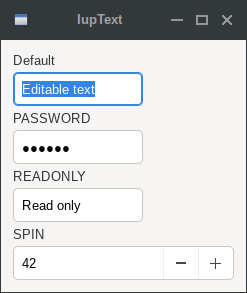
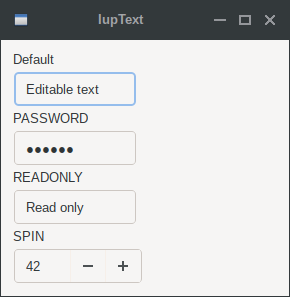
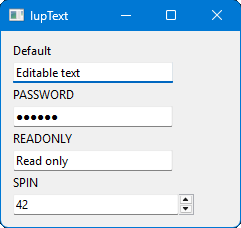
Examples
| GTK | Qt | Win32 | macOS |
 |
 |
 |
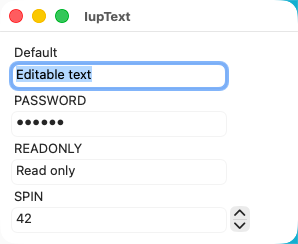 |
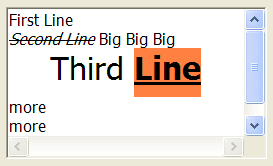
When FORMATTING=YES in Windows or GTK (formatting attributes are set to a formatag object that it is a IupUser):
"ALIGNMENT"   = "CENTER"
"SPACEAFTER"  = "10"
"FONTSIZE"    = "24"
"SELECTION"   = "3,1:3,50"
"ADDFORMATTAG"

"BGCOLOR"     = "255 128 64"
"UNDERLINE"   = "SINGLE"
"WEIGHT"      = "BOLD"
"SELECTION"   = "3,7:3,11"
"ADDFORMATTAG"

"ITALIC"      = "YES"
"STRIKEOUT"   = "YES"
"SELECTION"   = "2,1:2,12"
"ADDFORMATTAG"