IupNotify
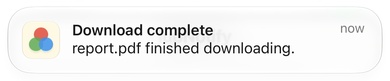
Creates a desktop notification. Displays a system notification with a title, body text, optional icon, and optional action buttons. Each notification should be destroyed using IupDestroy.
Creation
Ihandle* IupNotify(void);Returns: the identifier of the created element, or NULL if an error occurs.
Attributes
Content
TITLE (non-inheritable): The notification title text.
BODY (non-inheritable): The notification body text.
ICON (non-inheritable): Image name for the small notification icon shown next to the title. Use IupSetHandle or IupSetAttributeHandle to associate an image to a name. See also IupImage. In iOS, ICON is honored only with STYLE=TOAST.
IMAGE [macOS, Android, iOS and Haiku Only] (non-inheritable): Image name shown as the expanded content/preview image. Use IupSetHandle or IupSetAttributeHandle to associate an image to a name. In Android, TITLE and BODY are reused as the expanded title and summary. In macOS, it becomes the notification attachment, and ICON is used instead when IMAGE is not set.
SUBTITLE [macOS and iOS Only] (non-inheritable): The notification subtitle, displayed below the title.
Action Buttons
ACTION1, ACTION2, ACTION3, ACTION4 (non-inheritable): Labels for up to four action buttons displayed in the notification. Not supported in Win32 and Haiku.
Behavior
TIMEOUT (non-inheritable): Auto-dismiss timeout in milliseconds. Default: "-1" (use the system default). Not supported in Win32, WinUI and macOS. In iOS, only honored with STYLE=TOAST.
SILENT (non-inheritable): Suppress the notification sound.
Control
SHOW (write-only) (non-inheritable): Set to "YES" to display the notification. All content attributes (TITLE, BODY, ICON, etc.) should be set before showing.
CLOSE (write-only) (non-inheritable): Set to "YES" to close the notification.
ID [Unix, Android, Haiku and WebAssembly Only] (read-only) (non-inheritable): Returns the notification identifier assigned by the system after a successful SHOW.
AVAILABLE (read-only) (non-inheritable): Returns "YES" if the system can show notifications, "NO" otherwise. In Unix, it is "YES" when a notification server is running or can be started on the session bus. In Android, it is "NO" when the notifications of the application are disabled or not permitted. In WebAssembly, it is "YES" when the browser has the Notification API. In macOS and iOS, the permission is reported by PERMISSION.
Platform-Specific
URGENCY [Unix, Android and Haiku Only] (non-inheritable): Notification urgency level. Can be "LOW", "NORMAL" or "HIGH". Default: "NORMAL".
APPICON [Unix, Android and WebAssembly Only] (non-inheritable): Application icon name used as a fallback when ICON is not set.
TRANSIENT [Unix and Android Only] (non-inheritable): When set, the notification is transient and may be skipped from the notification history.
PERMISSION [macOS and iOS Only] (read-only) (non-inheritable): Returns the current notification permission status. Can be "GRANTED", "DENIED" or "PROMPT" (not asked yet).
REQUESTPERMISSION [macOS and iOS Only] (write-only) (non-inheritable): Set to "YES" to request notification permission from the user. Apps should request it once at startup; until granted, SHOW fires ERROR_CB.
THREADID [macOS, iOS and Haiku Only] (non-inheritable): Notification thread identifier used to group related notifications together.
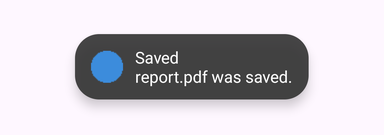
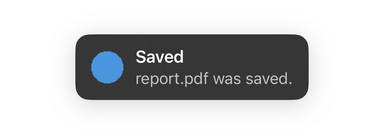
STYLE [Android and iOS Only] (non-inheritable): Selects the delivery channel. Values: "NOTIFICATION" (default) or "TOAST" (transient in-app overlay). TOAST does not require notification permission. TITLE, BODY, ICON, and TIMEOUT are honored; ACTION1-4, SUBTITLE, and other notification-only attributes are ignored.
PROGRESS [Android and Haiku Only] (non-inheritable): Adds a progress bar. An integer from 0 to 100 shows a determinate bar; "INDETERMINATE" shows a continuous animation. Re-issuing SHOW with the same Ihandle updates the bar in place. In Haiku, "INDETERMINATE" is not supported.
CHANNELID [Android Only] (non-inheritable): Notification channel id, overriding the default channel chosen from URGENCY. If the channel does not yet exist it is created with IMPORTANCE; existing channels are reused unchanged.
IMPORTANCE [Android Only] (non-inheritable): Channel importance used when creating a new CHANNELID. Values: "NONE", "MIN", "LOW", "DEFAULT", "HIGH", "MAX". Default: "DEFAULT".
Callbacks
NOTIFY_CB: Called when the user interacts with the notification.
int function(Ihandle *ih, int action_id);ih: identifier of the element that activated the
event.
action_id: 0 for the default action (clicking the
notification body), 1-4 for ACTION1 through ACTION4 buttons.
Returns: IUP_CLOSE will be processed.
DISMISS_CB: Called when the notification is dismissed.
int function(Ihandle *ih, int reason);ih: identifier of the element that activated the
event.
reason: 0 for unknown, 1 for timeout/auto-dismiss, 2
for user-dismissed, 3 for programmatic close (CLOSE attribute).
Returns: IUP_CLOSE will be processed.
ERROR_CB: Called when an error occurs during notification initialization or display.
int function(Ihandle *ih, char *error_msg);ih: identifier of the element that activated the
event.
error_msg: description of the error.
Notes
IupNotify does not create a visible IUP element. It is a non-interactive control that interfaces with the operating system's native notification service.
The notification is displayed asynchronously and callbacks are dispatched through the IUP event loop.
In Win32, the notification has no action buttons. In Unix, the
supported features depend on the running notification daemon. In macOS
and iOS, the application needs the notification permission and a valid
bundle identifier. In Android, STYLE=NOTIFICATION needs the
android.permission.POST_NOTIFICATIONS permission on API 33
and newer.
Examples
| GTK | WinUI | macOS |
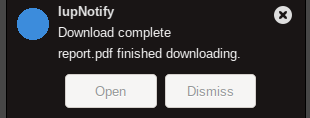 |
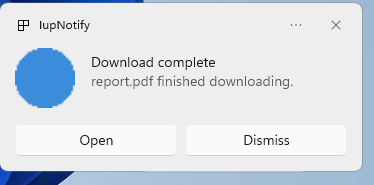 |
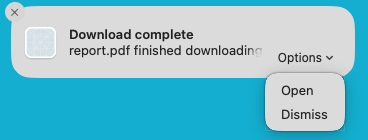 |
| Android | iOS |
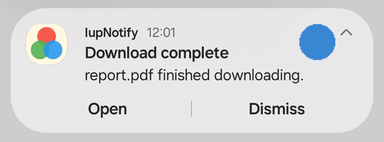 |
 |
STYLE=TOAST:
| Android | iOS |
 |
 |